
Mobile site revamp
See Tickets is one of the largest ticketing platforms in Europe. When I joined, their mobile experience was – bluntly – just the desktop site loaded on a phone.
Users were pinching and zooming to tap links the size of a fingernail, trying to buy gig tickets on their commute. It wasn’t working. I redesigned the mobile site from scratch, creating a fully dynamic, responsive experience across iOS, Android and Windows that reduced the average ticket-buying process by over 7 minutes – a 76% improvement in processing time.
My role
I was the sole UX/UI designer on the project, responsible for the full end-to-end redesign of the See Tickets mobile site. That covered user research, Google Analytics analysis, user flows, wireframes, prototyping and the final UI.
I worked within the See Tickets brand but had creative freedom to do what was best for the experience, using current mobile UX patterns and responsive design principles throughout.
Key challenges:
A desktop site pretending to be a mobile site
Challenge
The existing mobile site was literally the desktop site scaled down to fit a phone screen. Touch targets were tiny, links were impossible to tap accurately with a finger, and the layout gave no consideration to how people actually use their phones.
Solution
I redesigned every screen from the ground up with mobile-first thinking.
Touch targets were sized correctly, layouts were restructured for vertical scrolling, and every interaction was reconsidered for a one-handed, on-the-go user.
Key challenges:
Buying tickets is time-sensitive
Challenge
Ticket purchasing isn’t a casual experience – popular events sell out fast, and a slow or frustrating checkout means lost sales.
The previous process took users an average of 10 minutes from search to confirmation.
Solution
I streamlined the entire user flow, focusing specifically on the areas where Google Analytics showed the highest drop-off rates.
For logged-in users with saved card details, the process from finding an event to completing purchase came down to four clicks. After launch, the average processing time dropped from 10 minutes to under 3 – a 76% improvement.
Key challenges:
Making the experience feel personal
Challenge
A generic list of events isn’t useful when you’re on your phone in Leicester wondering what’s on this weekend.
The site needed to surface relevant content without the user having to dig for it.
Solution
I integrated geolocation so the site automatically surfaced events within a set radius of the user’s location. Users could also favourite artists and genres, which the homepage used to personalise results on return visits.
Notification opt-ins meant users never missed a ticket sale for an event they’d saved.
Key challenges:
Preventing drop-off at checkout
Challenge
Tickets held in a basket but never purchased was a real problem – both for users who forgot and for bots bulk-buying stock.
Solution
I introduced a 5-minute checkout timer. If a purchase wasn’t completed, tickets were released back into the pool.
This kept inventory accurate and created a genuine sense of urgency that actually helped conversion rather than hurting it.
Ideation:
Research
Before touching a single wireframe I dug into the data. I timed the full user journey – from searching for an event through to receiving confirmation – to establish a baseline average.
I analysed Google Analytics to identify where users were regularly dropping off, and used those pain points to prioritise what to fix first.
I also produced process flows and wireframes to share with stakeholders and the customer service team, using their feedback to refine the designs before development began.
Wireframes:
Location screen
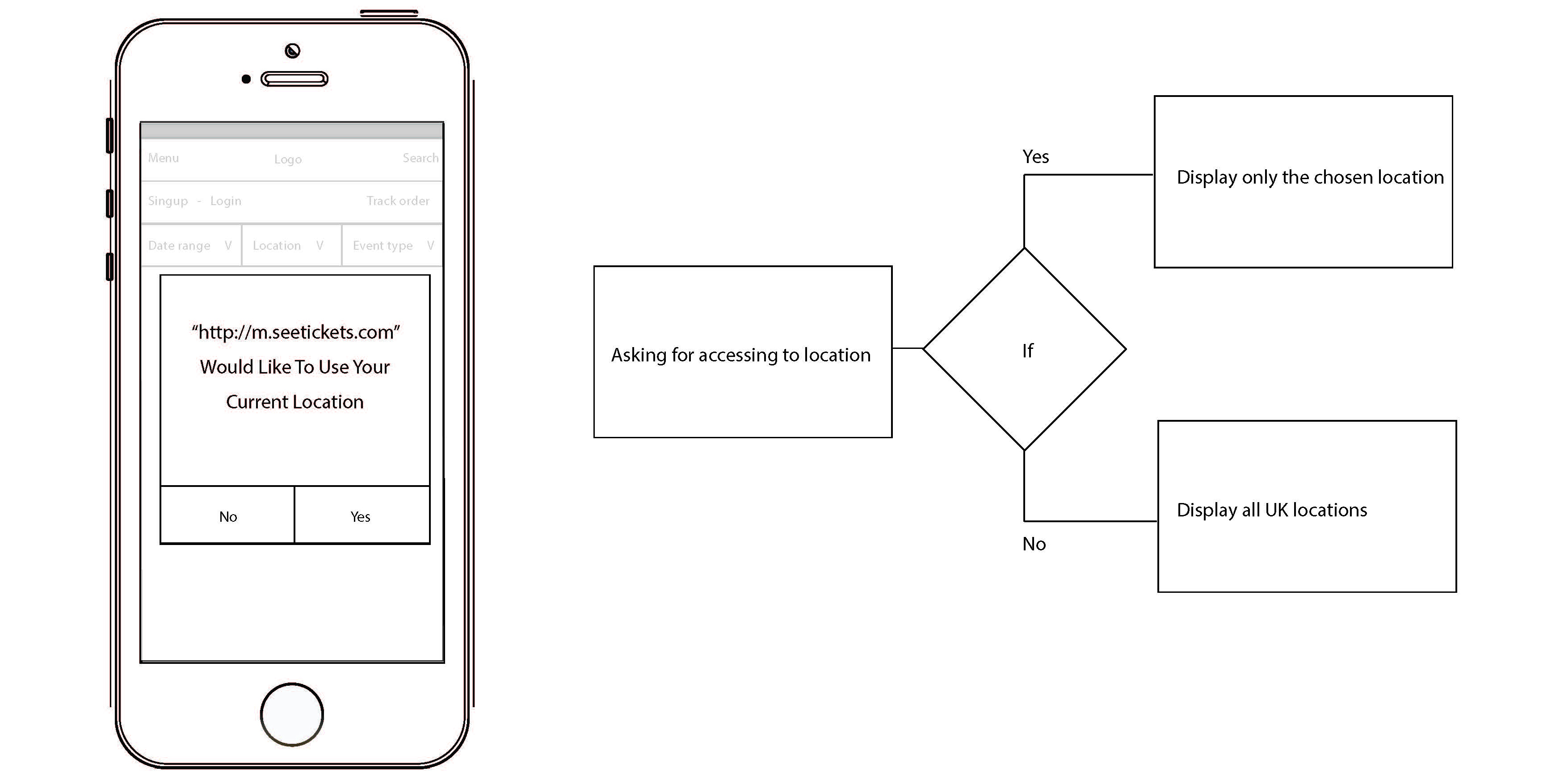
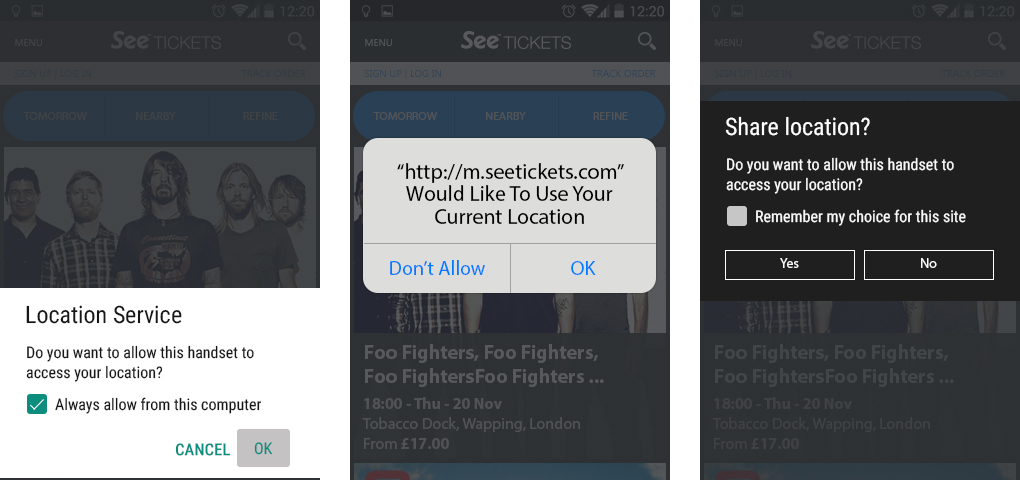
On first visit, users are asked whether the site can access their location – keeping events relevant to wherever they are in the world. A search bar gave an alternative for anyone searching a specific city or area.
Wireframes:
Sign up and login
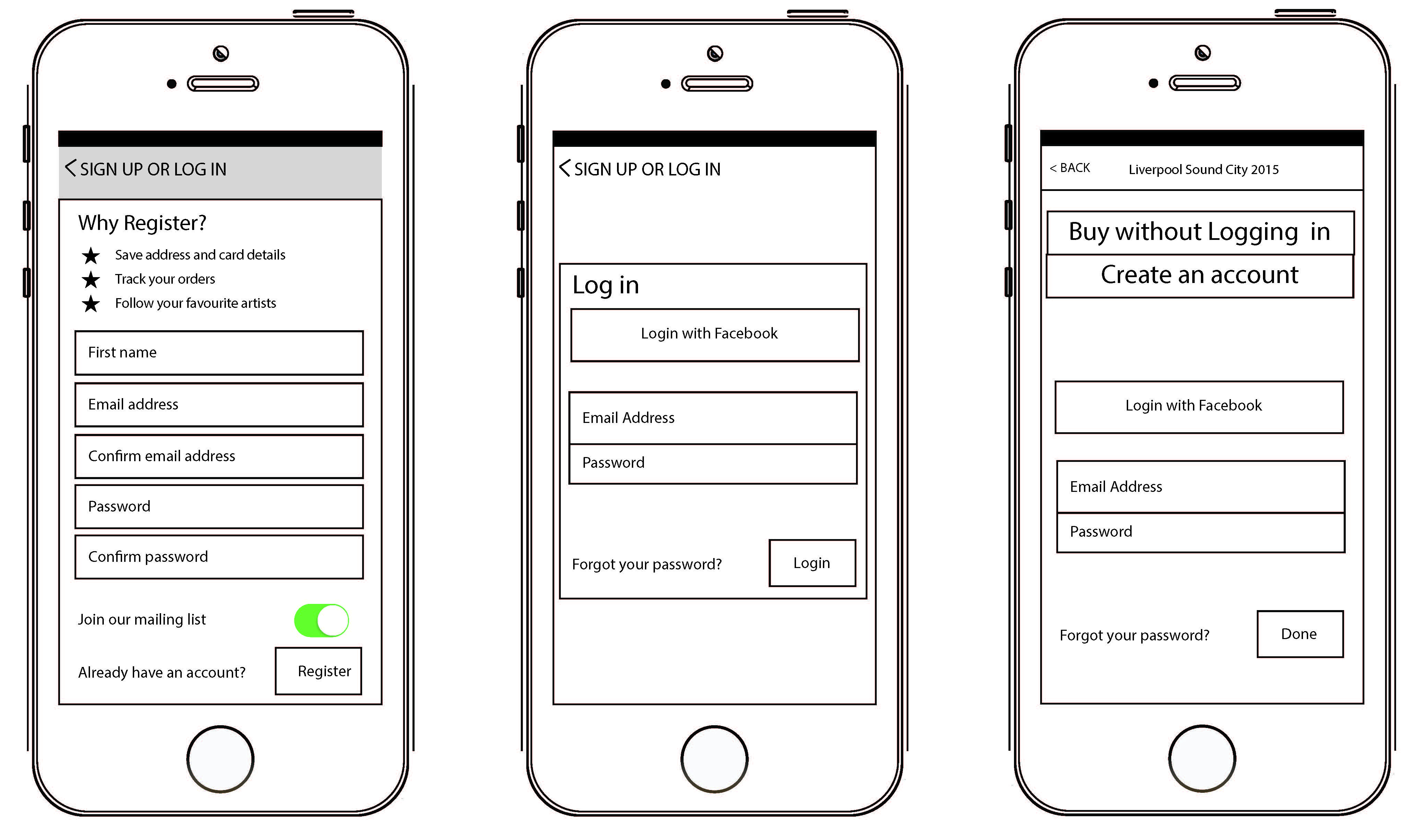
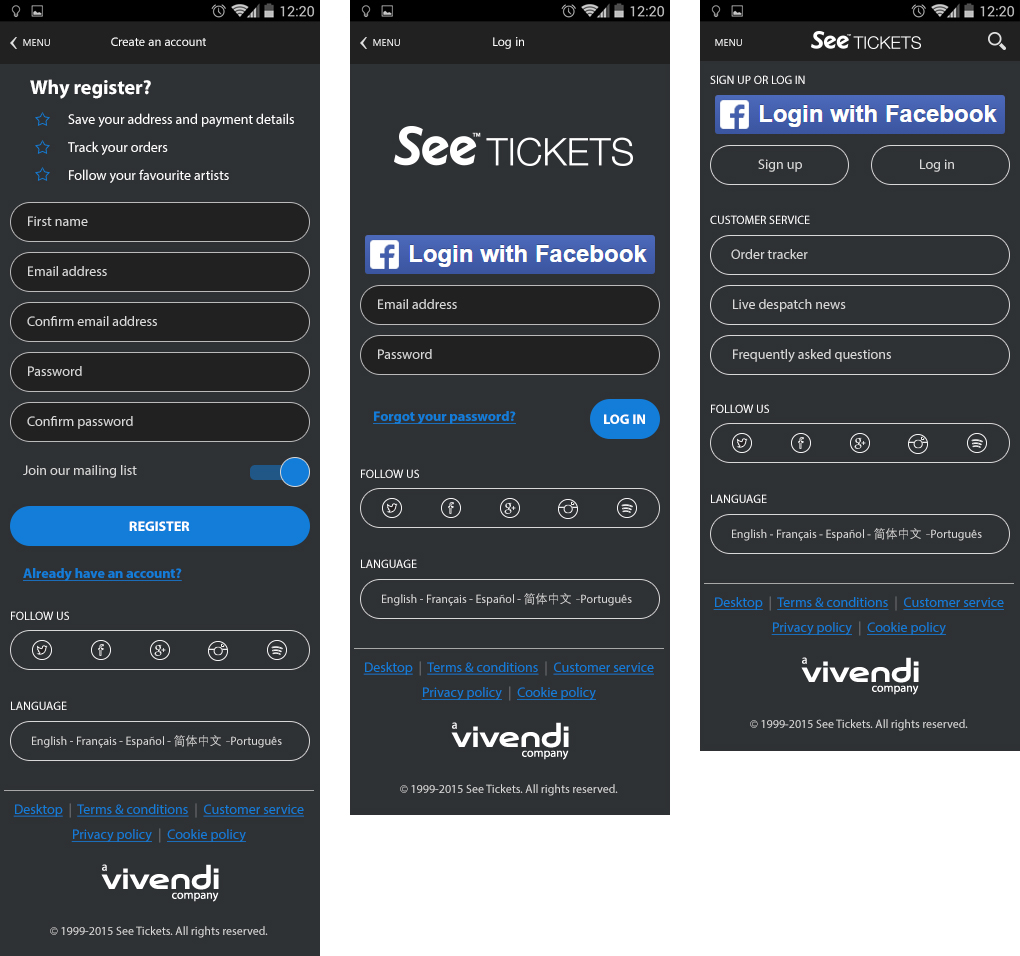
Users could browse freely without an account, but needed to log in or sign up at the point of purchase.
Creating an account unlocked favourites, saved details and a faster checkout – all of which made the time-sensitive process of buying tickets considerably less stressful.
Wireframes:
Homescreen
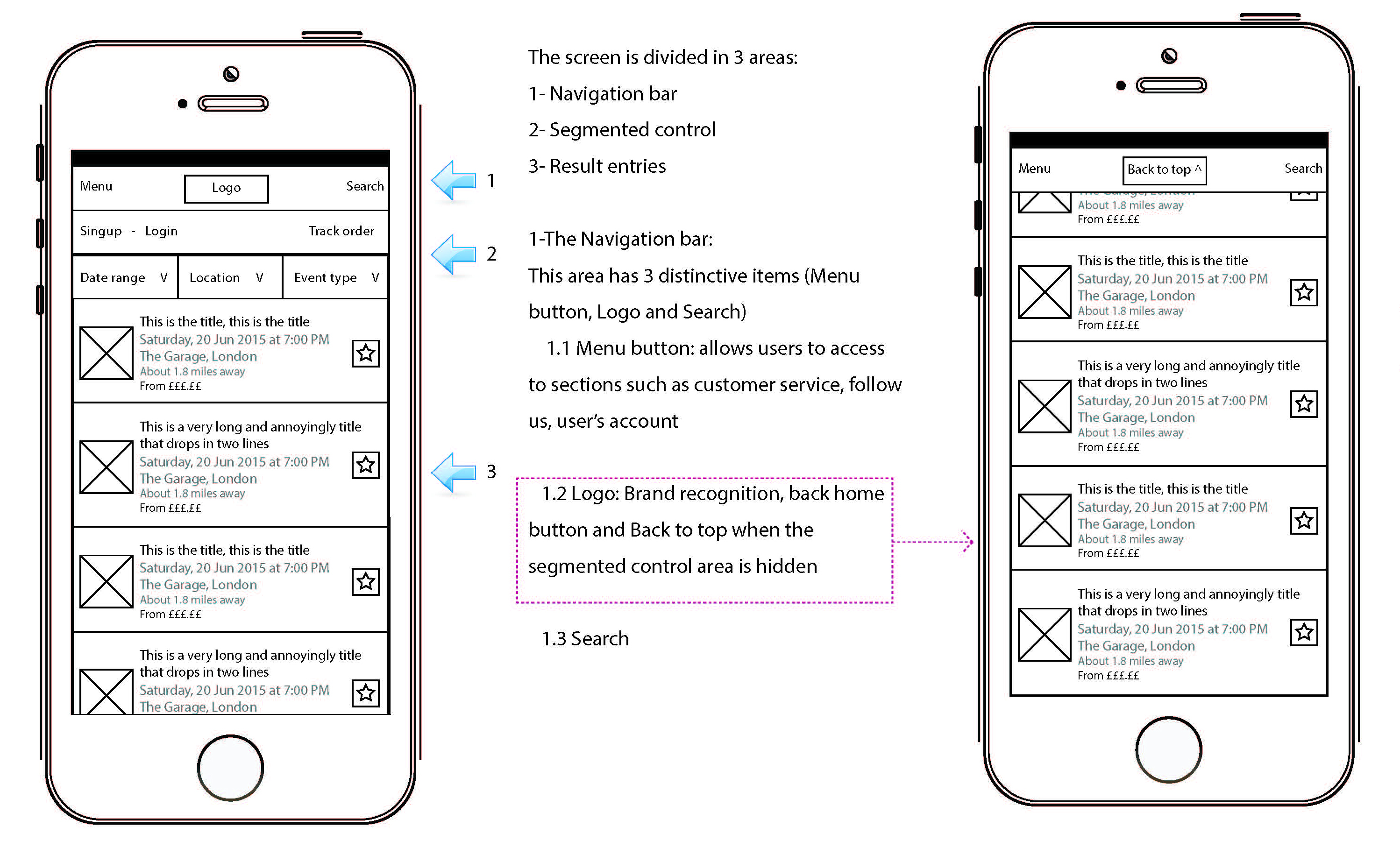
The home screen was split into filterable sections – date range, location and event type – with results updating dynamically as filters changed.
Events loaded infinitely, with the ability to favourite individual events for quick access later. Favouriting an event also triggered optional notifications for ticket sales and low availability alerts.

Wireframes:
Filtering and search results
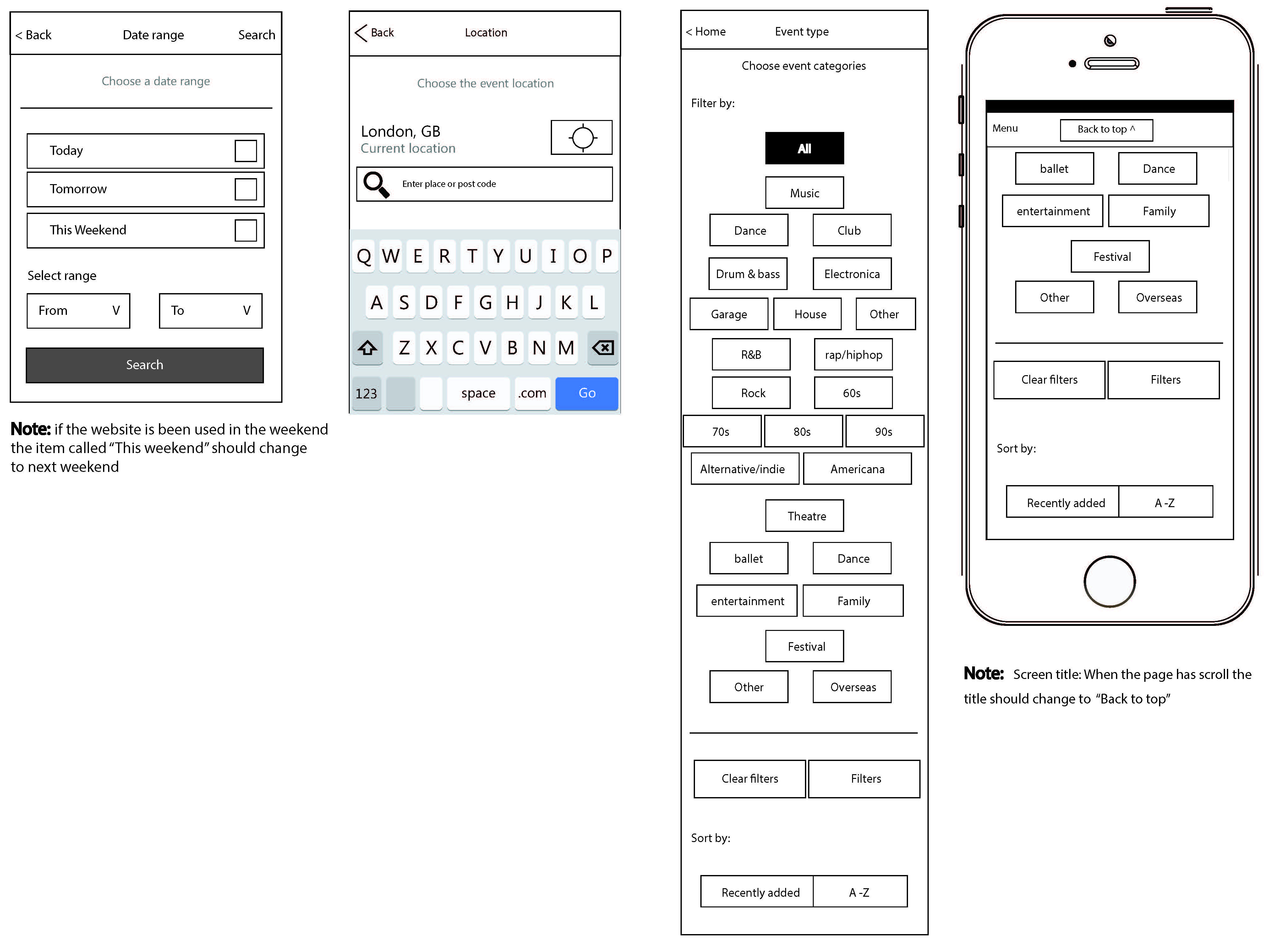
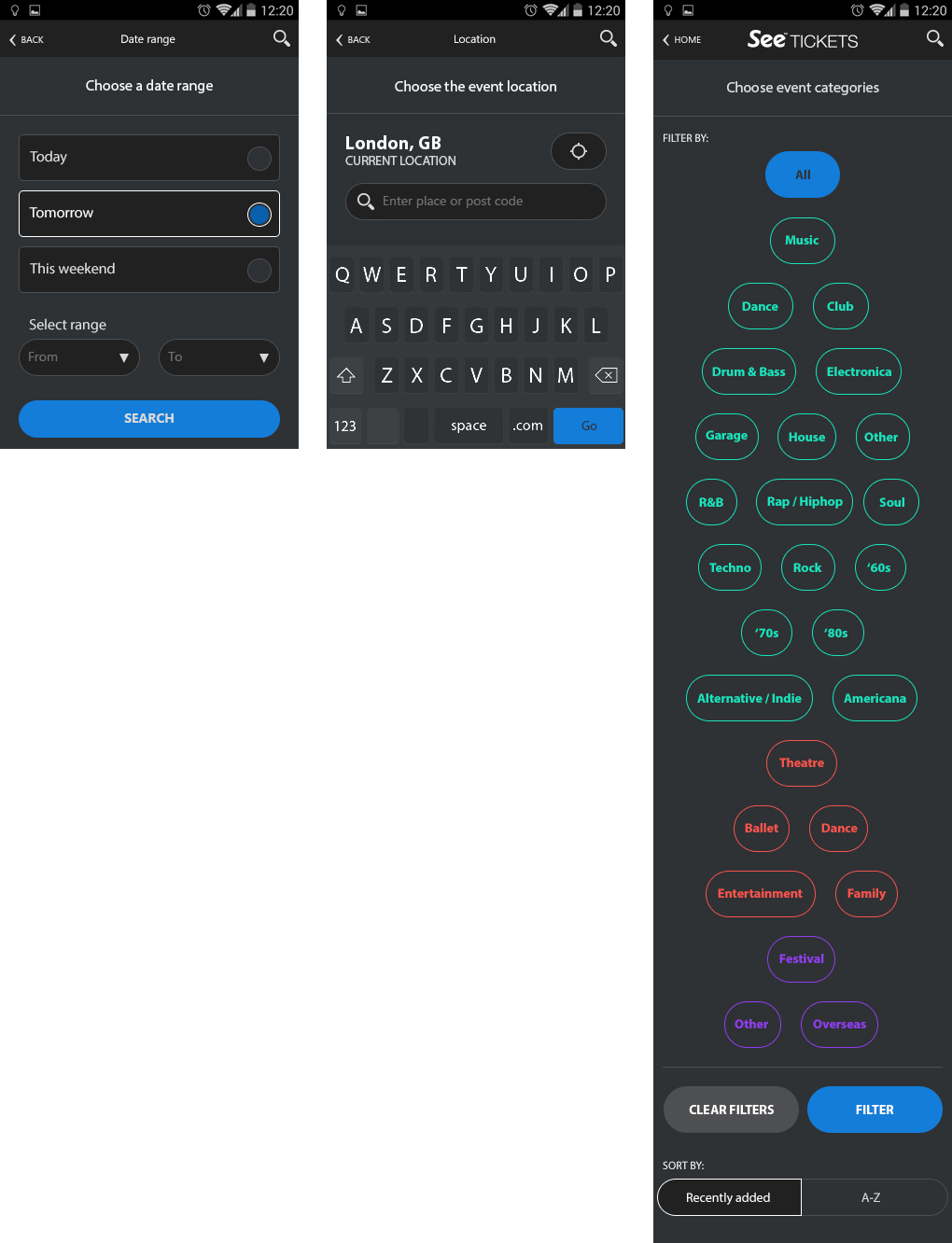
Users could narrow results by date range, events happening that day, the next day or at the weekend. Geolocation pulled in events within a set radius, and saved artist preferences were used to personalise the homepage feed automatically.
Wireframes:
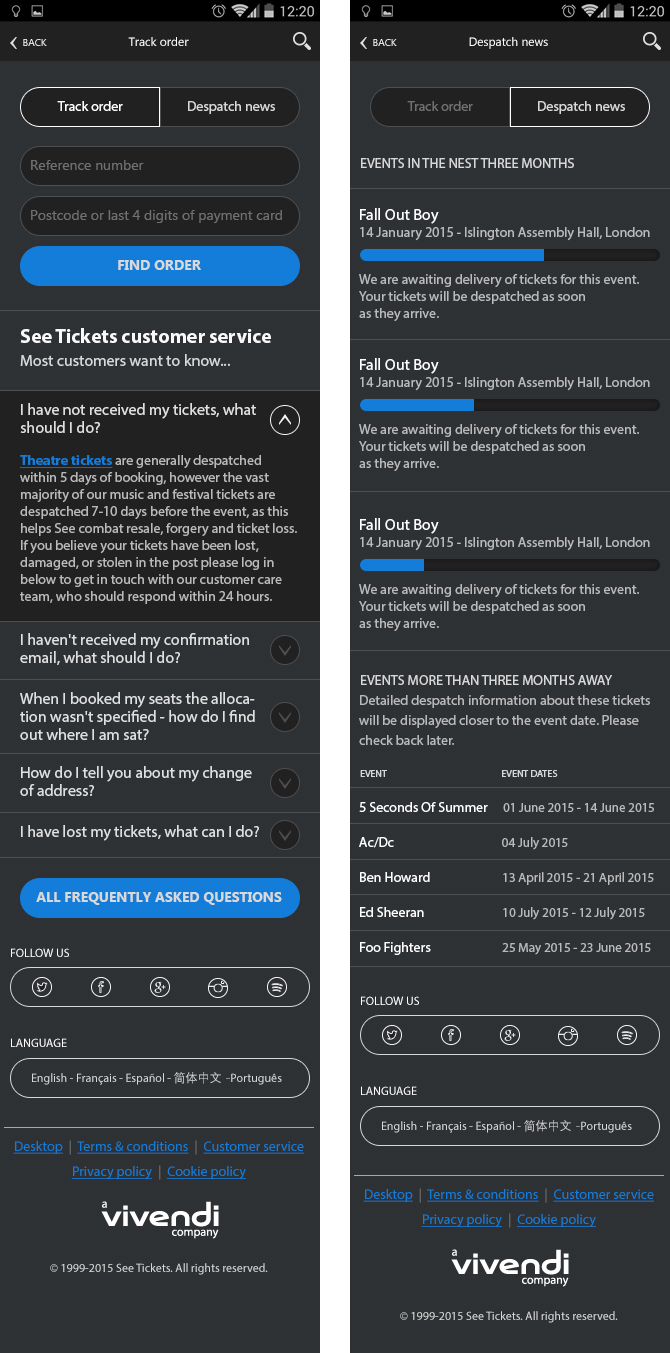
Tracking and despatch
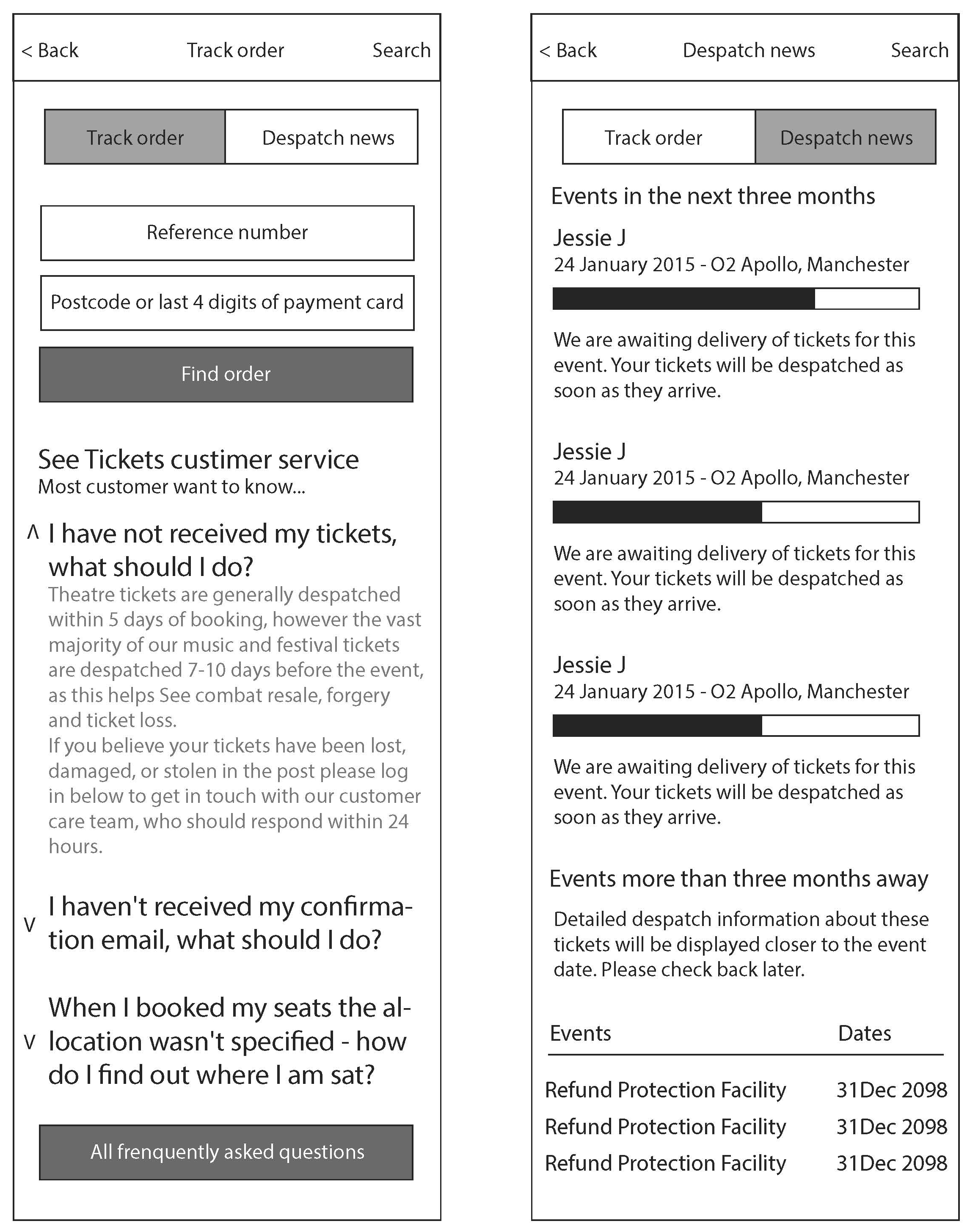
For orders already placed, a dedicated tracking area showed the current status of ticket despatch with a progress bar, alongside FAQs covering common delivery queries.
Wireframes:
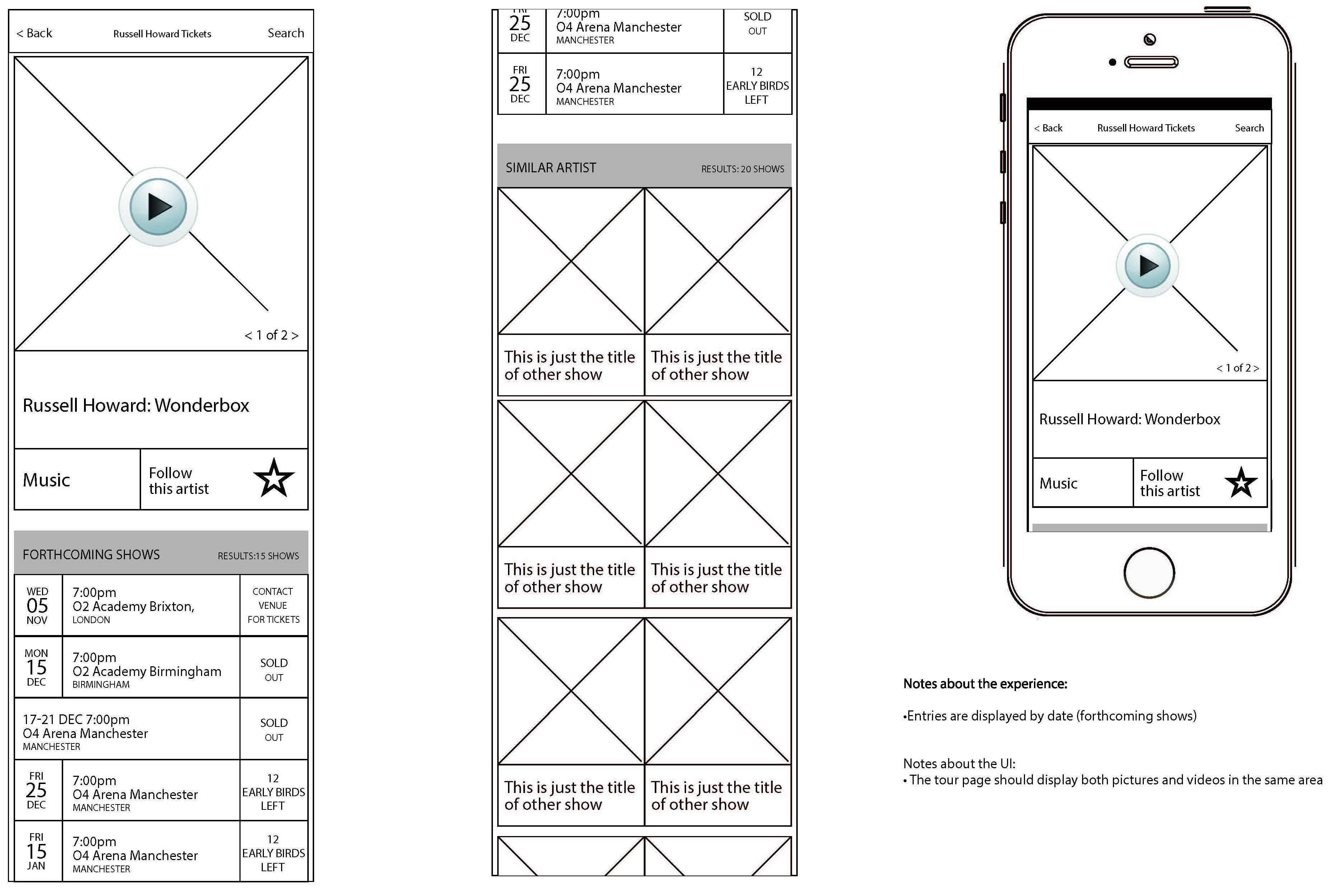
Tour page
The tour page let users select their preferred date and venue for an event, with swipeable promotional images and videos. A Similar Artists section at the bottom encouraged further browsing and discovery.

Wireframes:
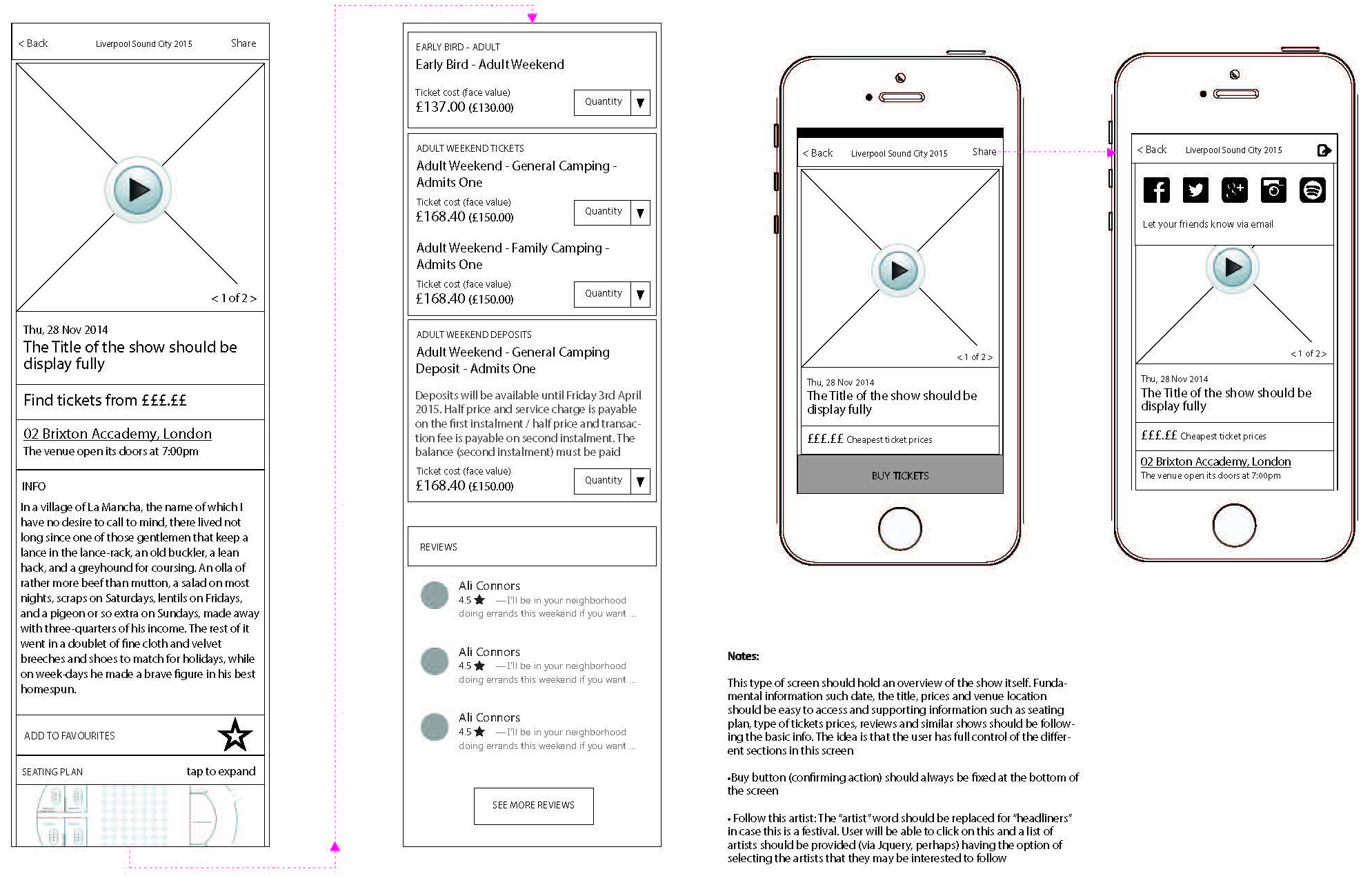
Event page
Users selected their ticket quantity and were shown supporting information – seating plan, venue location and directions – all in one place before adding to their basket.

Wireframes:
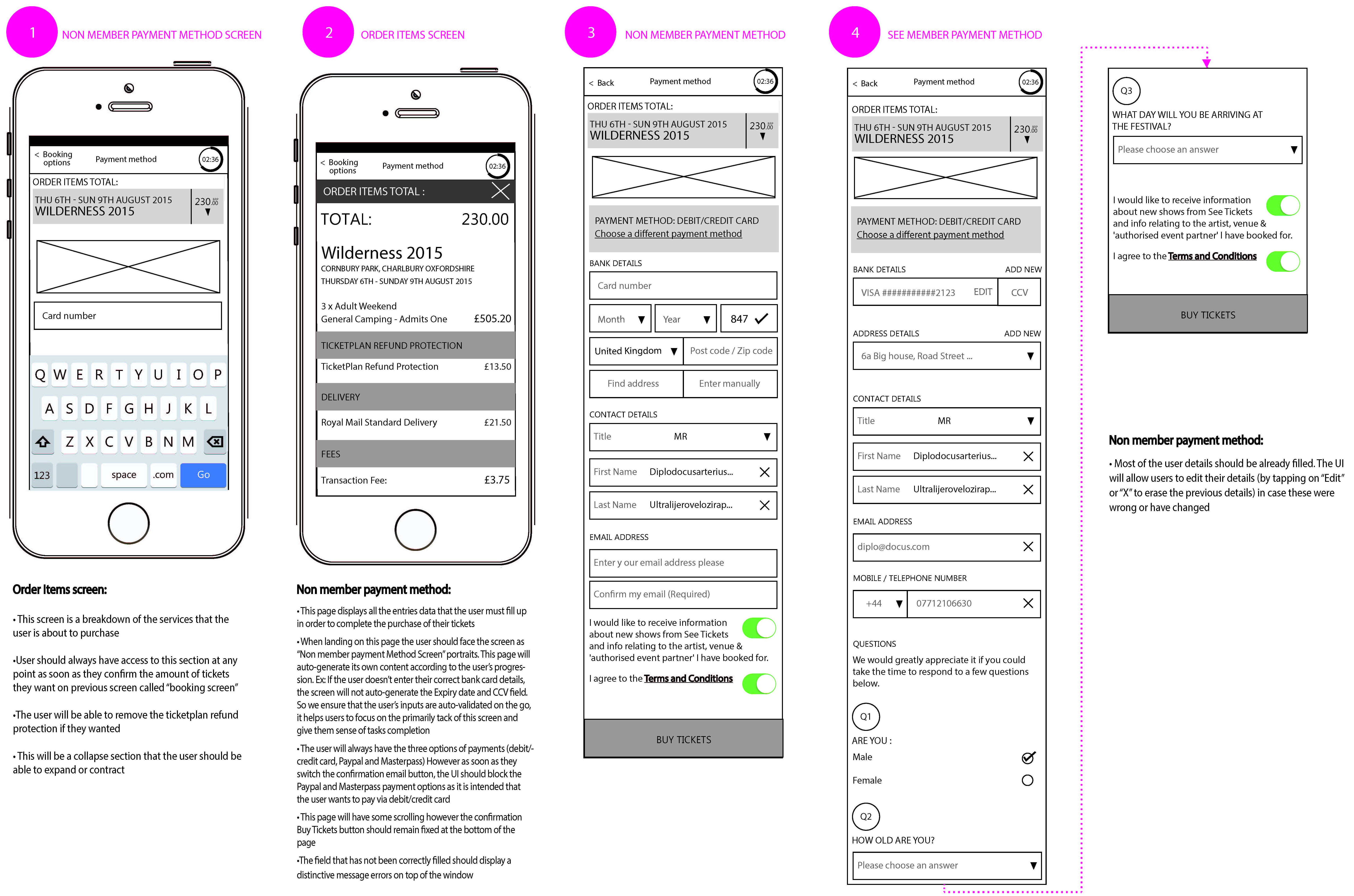
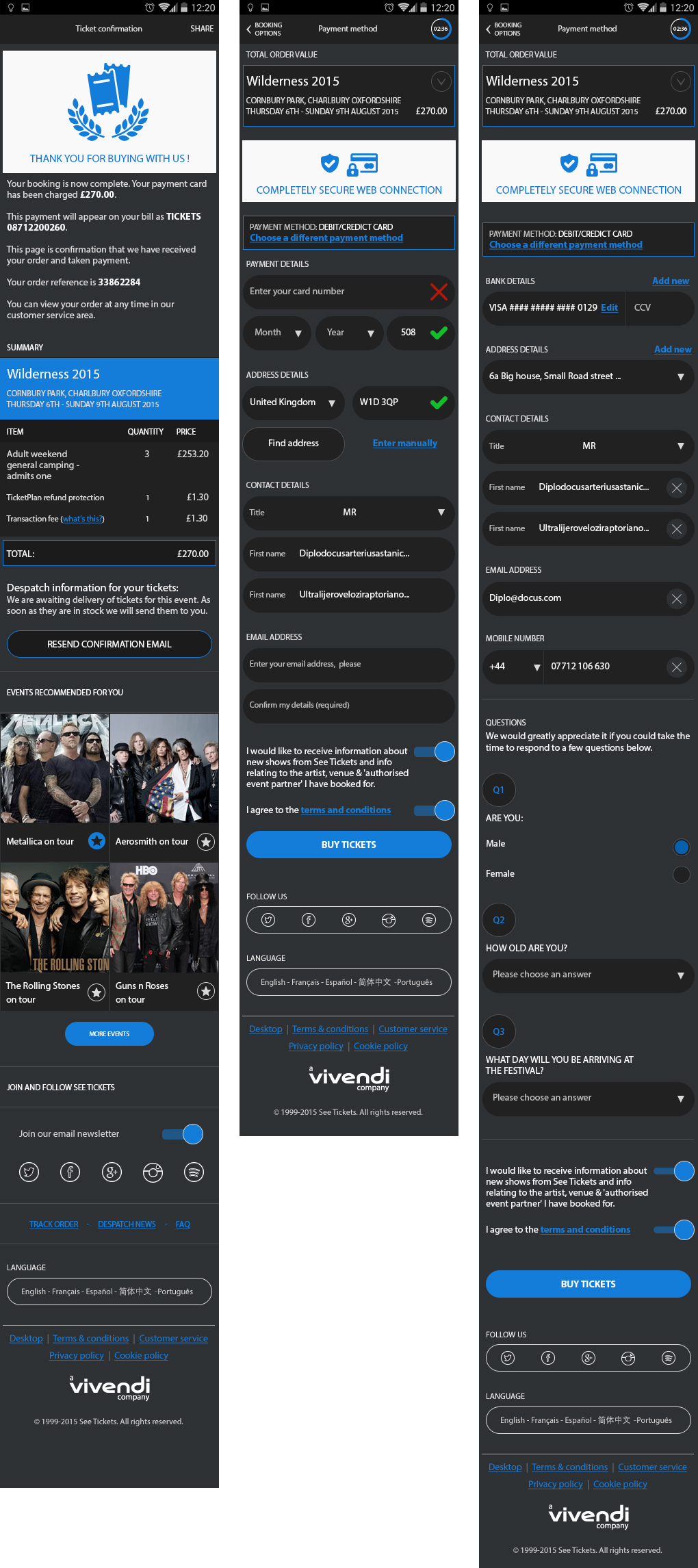
Checkout
Saved card details meant returning users could complete their purchase in a single tap. New users filled in their details once, with those saved for next time. The 5-minute timer kept the process focused and inventory clean.
Outcomes:
The results
%
The numbers speak for themselves. Before the redesign, the average time from searching for an event to receiving a confirmation was 10 minutes.
After launching the new mobile site, that figure dropped to under 3 minutes – a 76% reduction in processing time.
Mobile site revamp
See Tickets is one of the largest ticketing platforms in Europe. When I joined, their mobile experience was – bluntly – just the desktop site loaded on a phone.
Users were pinching and zooming to tap links the size of a fingernail, trying to buy gig tickets on their commute. It wasn’t working. I redesigned the mobile site from scratch, creating a fully dynamic, responsive experience across iOS, Android and Windows that reduced the average ticket-buying process by over 7 minutes – a 76% improvement in processing time.
My role
I was the sole UX/UI designer on the project, responsible for the full end-to-end redesign of the See Tickets mobile site. That covered user research, Google Analytics analysis, user flows, wireframes, prototyping and the final UI.
I worked within the See Tickets brand but had creative freedom to do what was best for the experience, using current mobile UX patterns and responsive design principles throughout.
Key challenges:
A desktop site pretending to be a mobile site
Challenge
The existing mobile site was literally the desktop site scaled down to fit a phone screen. Touch targets were tiny, links were impossible to tap accurately with a finger, and the layout gave no consideration to how people actually use their phones.
Solution
I redesigned every screen from the ground up with mobile-first thinking.
Touch targets were sized correctly, layouts were restructured for vertical scrolling, and every interaction was reconsidered for a one-handed, on-the-go user.
Key challenges:
Buying tickets is time-sensitive
Challenge
Ticket purchasing isn’t a casual experience – popular events sell out fast, and a slow or frustrating checkout means lost sales.
The previous process took users an average of 10 minutes from search to confirmation.
Solution
I streamlined the entire user flow, focusing specifically on the areas where Google Analytics showed the highest drop-off rates.
For logged-in users with saved card details, the process from finding an event to completing purchase came down to four clicks. After launch, the average processing time dropped from 10 minutes to under 3 – a 76% improvement.
Key challenges:
Making the experience feel personal
Challenge
A generic list of events isn’t useful when you’re on your phone in Leicester wondering what’s on this weekend.
The site needed to surface relevant content without the user having to dig for it.
Solution
I integrated geolocation so the site automatically surfaced events within a set radius of the user’s location. Users could also favourite artists and genres, which the homepage used to personalise results on return visits.
Notification opt-ins meant users never missed a ticket sale for an event they’d saved.
Key challenges:
Preventing drop-off at checkout
Challenge
Tickets held in a basket but never purchased was a real problem – both for users who forgot and for bots bulk-buying stock.
Solution
I introduced a 5-minute checkout timer. If a purchase wasn’t completed, tickets were released back into the pool.
This kept inventory accurate and created a genuine sense of urgency that actually helped conversion rather than hurting it.
Ideation:
Research
Before touching a single wireframe I dug into the data. I timed the full user journey – from searching for an event through to receiving confirmation – to establish a baseline average.
I analysed Google Analytics to identify where users were regularly dropping off, and used those pain points to prioritise what to fix first.
I also produced process flows and wireframes to share with stakeholders and the customer service team, using their feedback to refine the designs before development began.
Wireframes:
Location screen
On first visit, users are asked whether the site can access their location – keeping events relevant to wherever they are in the world. A search bar gave an alternative for anyone searching a specific city or area.
Wireframes:
Sign up and login
Users could browse freely without an account, but needed to log in or sign up at the point of purchase.
Creating an account unlocked favourites, saved details and a faster checkout – all of which made the time-sensitive process of buying tickets considerably less stressful.
Wireframes:
Homescreen
The home screen was split into filterable sections – date range, location and event type – with results updating dynamically as filters changed.
Events loaded infinitely, with the ability to favourite individual events for quick access later. Favouriting an event also triggered optional notifications for ticket sales and low availability alerts.
Wireframes:
Filtering and search results
Users could narrow results by date range, events happening that day, the next day or at the weekend. Geolocation pulled in events within a set radius, and saved artist preferences were used to personalise the homepage feed automatically.
Wireframes:
Tracking and despatch
For orders already placed, a dedicated tracking area showed the current status of ticket despatch with a progress bar, alongside FAQs covering common delivery queries.
Wireframes:
Tour page
The tour page let users select their preferred date and venue for an event, with swipeable promotional images and videos. A Similar Artists section at the bottom encouraged further browsing and discovery.
Wireframes:
Event page
Users selected their ticket quantity and were shown supporting information – seating plan, venue location and directions – all in one place before adding to their basket.
Wireframes:
Checkout
Saved card details meant returning users could complete their purchase in a single tap. New users filled in their details once, with those saved for next time. The 5-minute timer kept the process focused and inventory clean.
Outcomes:
The results
%
The numbers speak for themselves. Before the redesign, the average time from searching for an event to receiving a confirmation was 10 minutes.
After launching the new mobile site, that figure dropped to under 3 minutes – a 76% reduction in processing time.