Stock availability and Website revamp
HYPE is a British streetwear brand known for bold prints and casual apparel with a serious following. When I joined, the e-commerce website was generating a significant volume of negative feedback – customers paying for items only to be told they were out of stock, and then hearing nothing about it afterwards. The Trustpilot rating sat at 3.7.
I was brought in to lead a full UX overhaul, and while not everything made it to launch during my time there, the two most impactful pieces did – and the Trustpilot rating climbed to 4.3.
My role
I was the sole designer on the project, responsible for the full process end to end – research, data analysis, affinity mapping, user flows, wireframes, UI design, prototyping and design system foundations. Everything was built in Adobe XD.
The scope covered stock availability, order communications, account area, navigation, product pages, login flows, a component library and the beginnings of a full design system.
Research:
Data gathering
Before touching a wireframe I went straight to the data. HYPE had Trustpilot, Zendesk and Google Analytics – though Analytics wasn’t properly embedded and the data was unreliable, so Trustpilot and Zendesk did the heavy lifting.
I reviewed three months of feedback, focusing on 1 and 2 star reviews, and started grouping complaints into themes.
The volume was striking. Two issues dominated everything else:
Beyond those two, there were 13 complaints about product quality or incorrect sizing, and 6 about poor customer service.
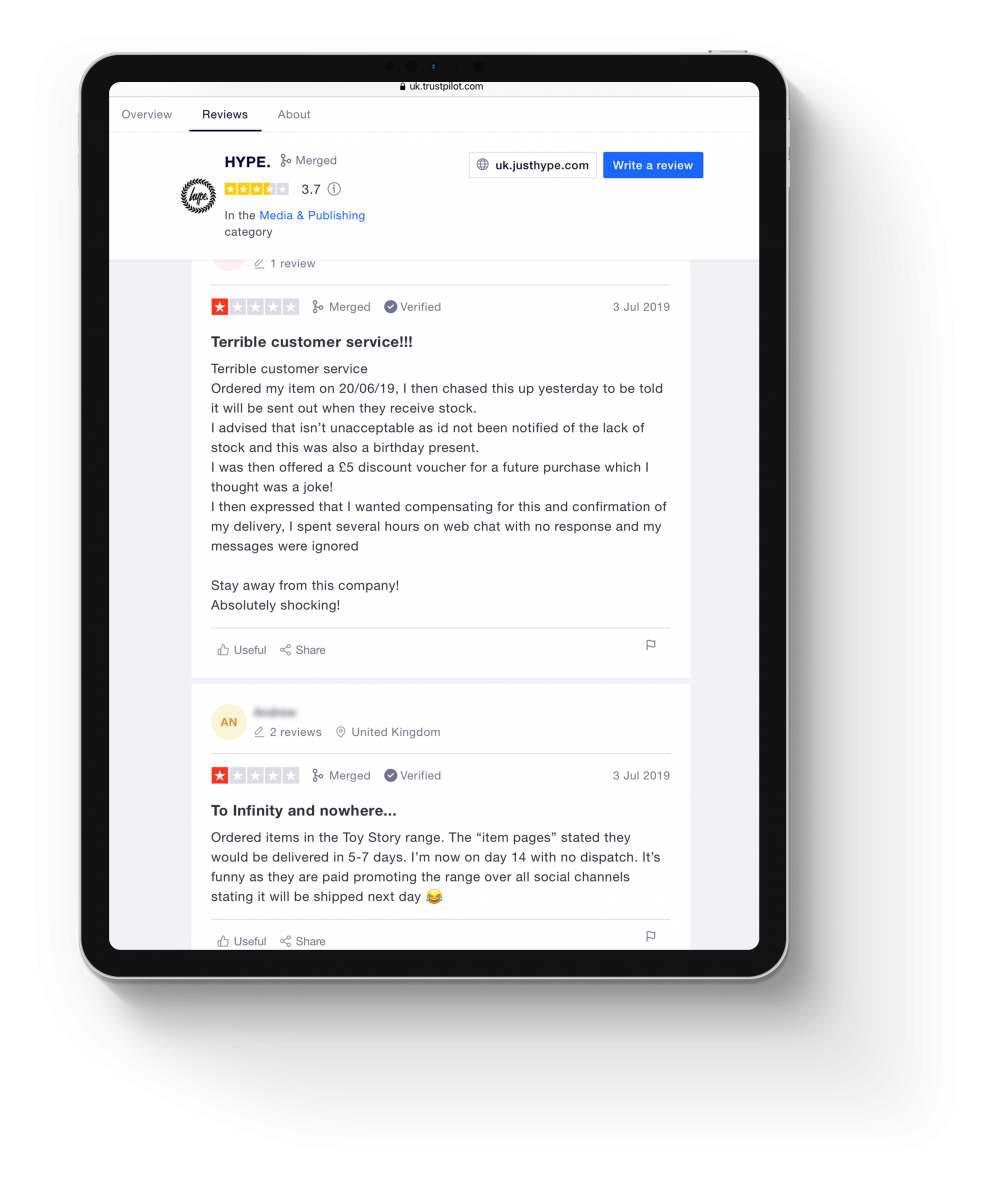
The Trustpilot reviews told the story clearly:
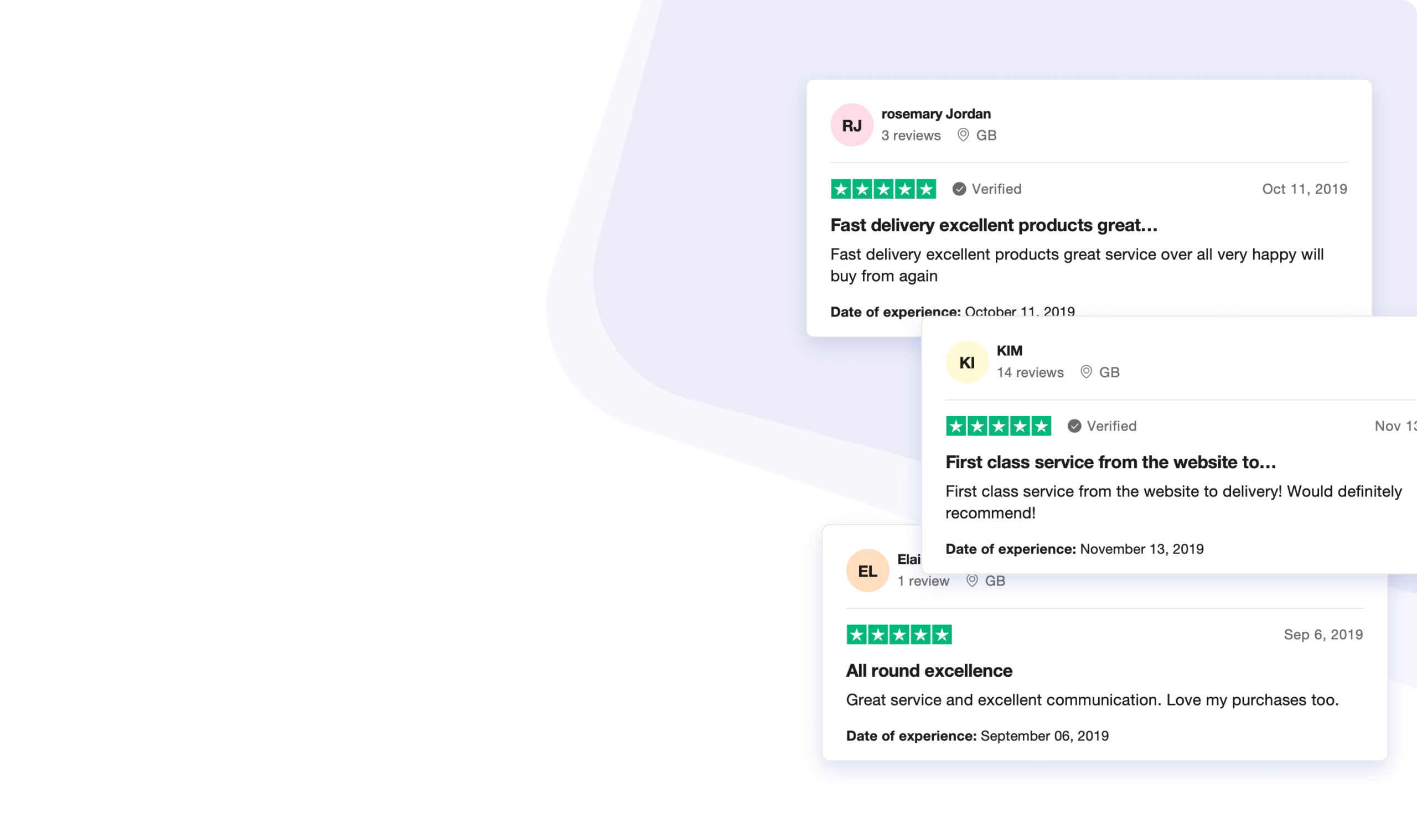
Received an email the following day saying my order had been cancelled and I had been refunded due to no stock availability
Research:
Affinity mapping
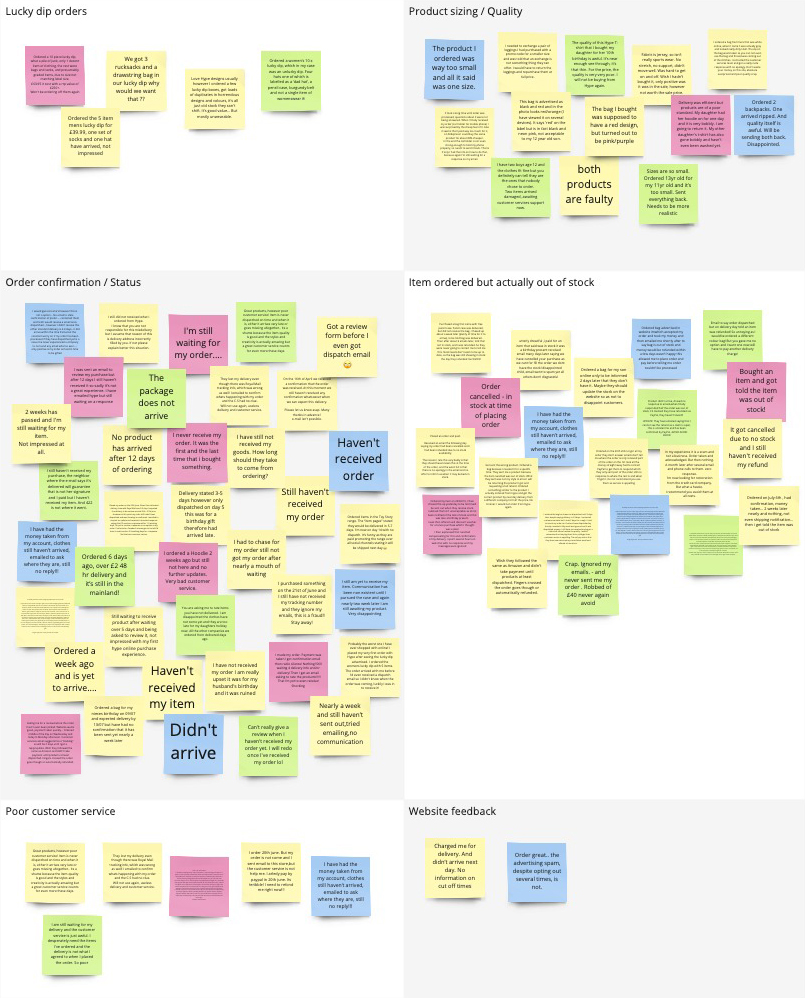
I mapped the complaints into categories to find the patterns – grouping feedback from the three month window under common themes.
Two areas jumped out immediately as the priority: stock transparency and order communication. Everything else was secondary.
Ideation:
Journey flows
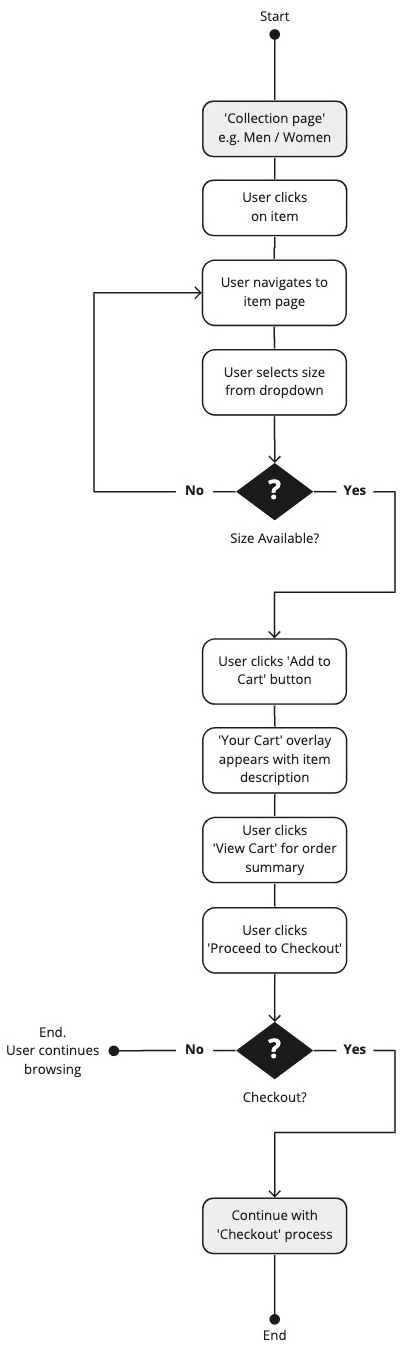
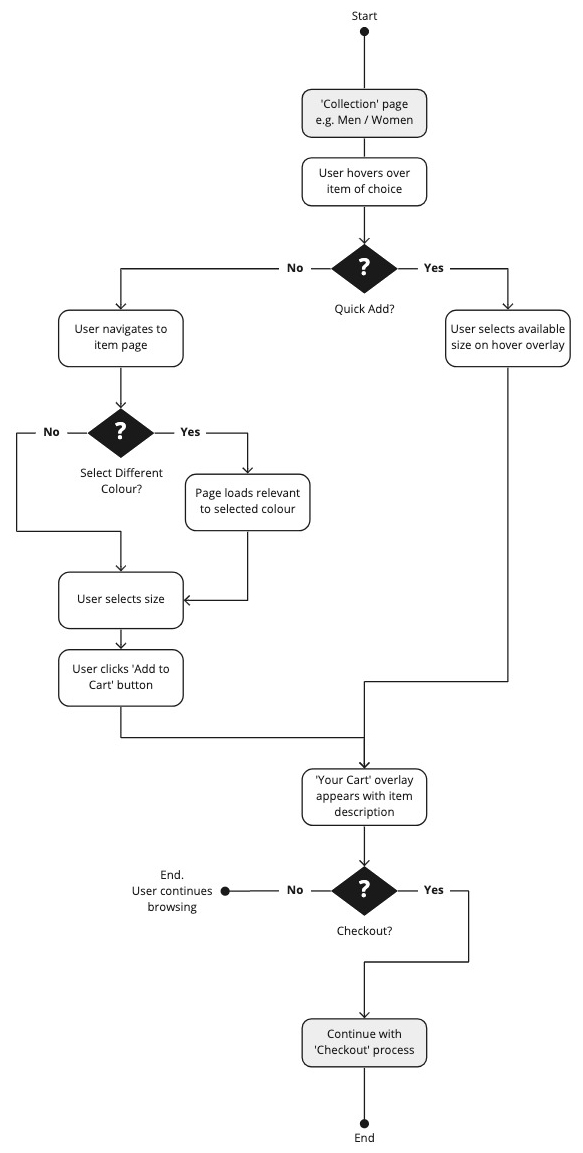
To understand the scale of the problem I mapped out the current checkout journey against a proposed new one – comparing them side by side to highlight where friction could be removed.
Current flow
Click count: 18+
A user selects an item, chooses a size from a dropdown that gives no indication of stock availability, adds to cart, proceeds through multiple checkout screens and enters their full details from scratch every single time – name, email, shipping address, billing address, card number, card name, expiry date, security code and mobile number.
After all of that, they find out the item is out of stock. They’ve already been charged.
Proposed flow
Click count: 4
Hover over an item to see available sizes. Select a size. Choose a saved payment method. Confirm order. Done.
For returning customers with saved details, that’s the entire journey.
Key challenges:
Customers buying items that were out of stock
Challenge
The existing size selector on the product page showed all sizes but gave no indication of availability.
Customers selected a size, added to cart, completed the entire checkout and only after hitting Complete Order were they told the item wasn’t available. They’d been charged.
The refund took 3–5 working days. It’s not hard to see why people were furious.
Solution
I designed a Quick Add feature for the product card. On hover, an overlay appeared showing which sizes were available for that item, with unavailable sizes shown with a strikethrough.
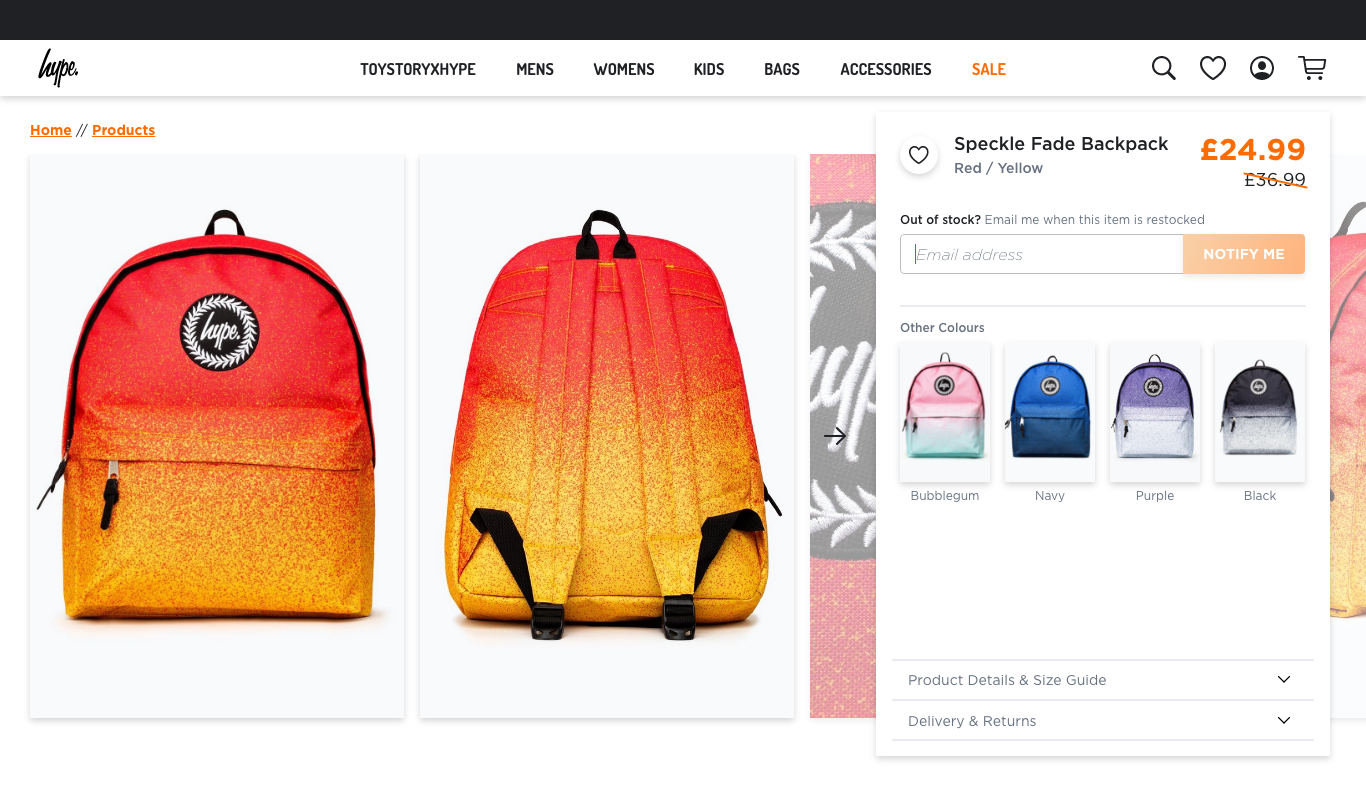
Customers could see stock status before clicking through to anything. If their size was out of stock, they could tap it to enter their email and be notified when it came back in.
Selecting an available size added it directly to the basket. For logged-in users with saved payment details, the checkout came down to 4 clicks.
Key challenges:
No communication after purchase
Challenge
Once an order was placed, customers heard nothing. No confirmation, no dispatch notification, no tracking. Some customers only received an email asking them to review a product that hadn’t even arrived yet – which understandably made people wonder if it was a scam.
When I dug into the email settings, I found there wasn’t any logic in place driving the communications at all. I also discovered that customers with personalised email addresses outside of Gmail, Outlook or Yahoo were getting bounced entirely — their emails were never sending.
I fixed the settings first, which was an immediate win, then designed a full communication system around it.
Solution
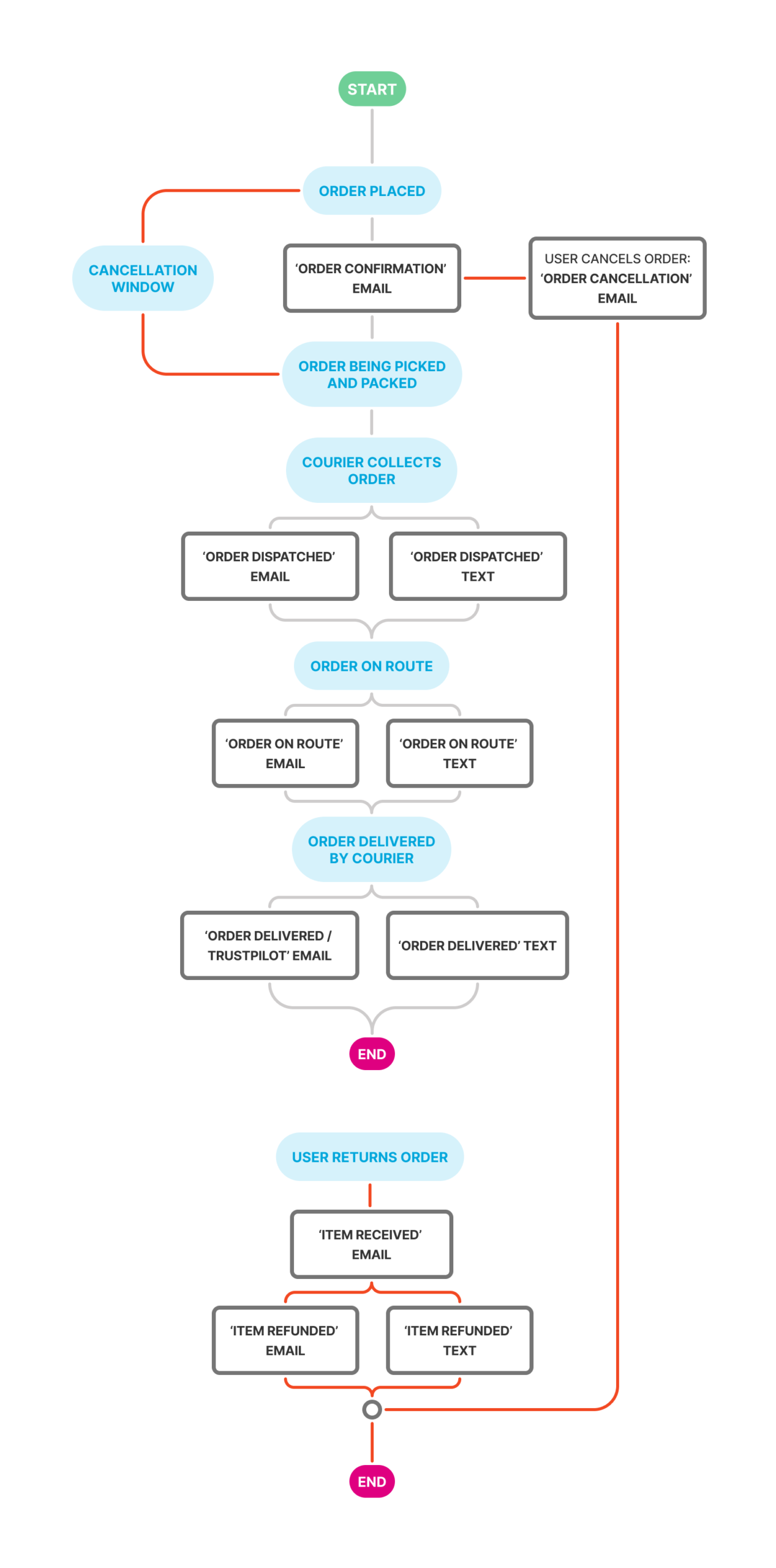
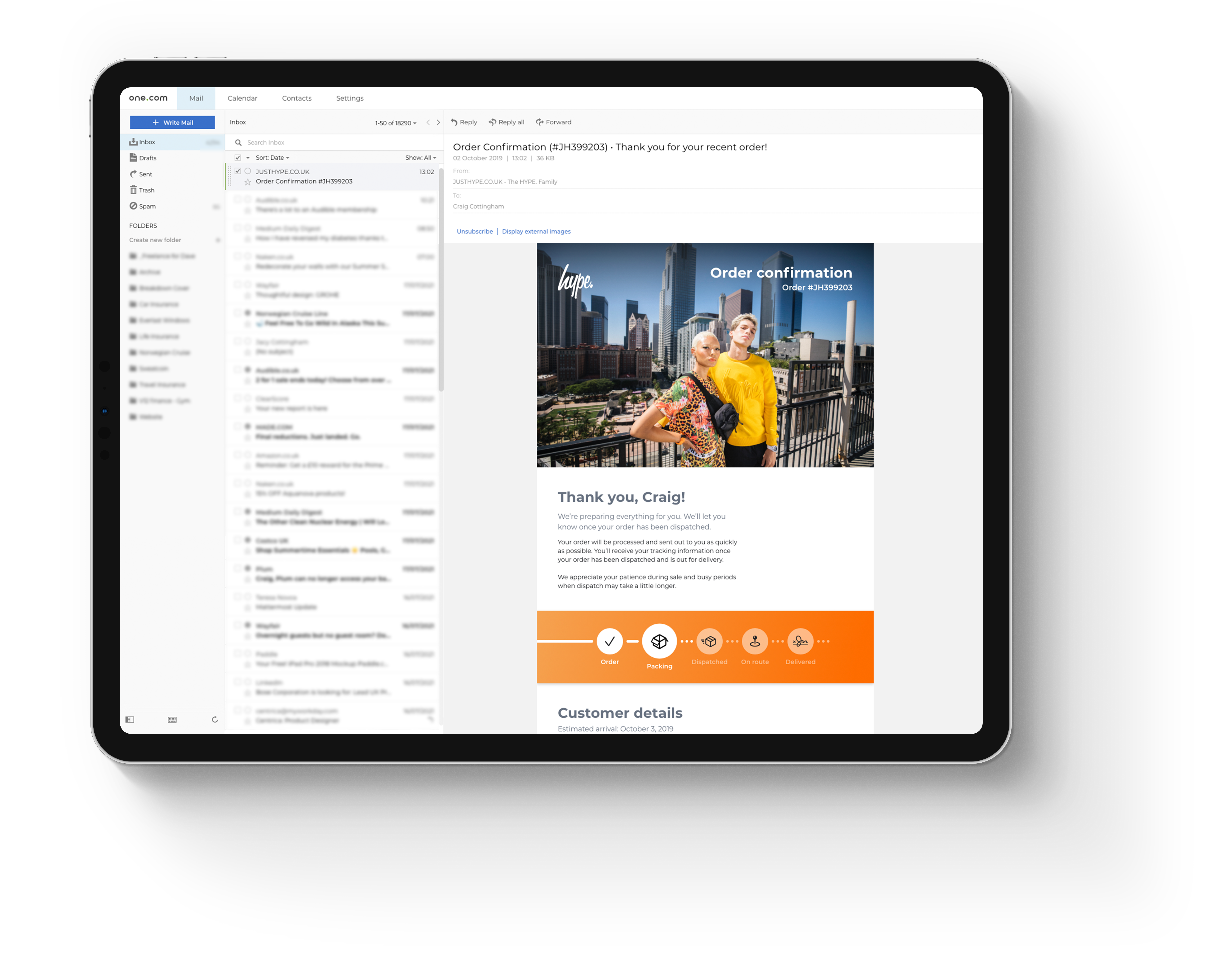
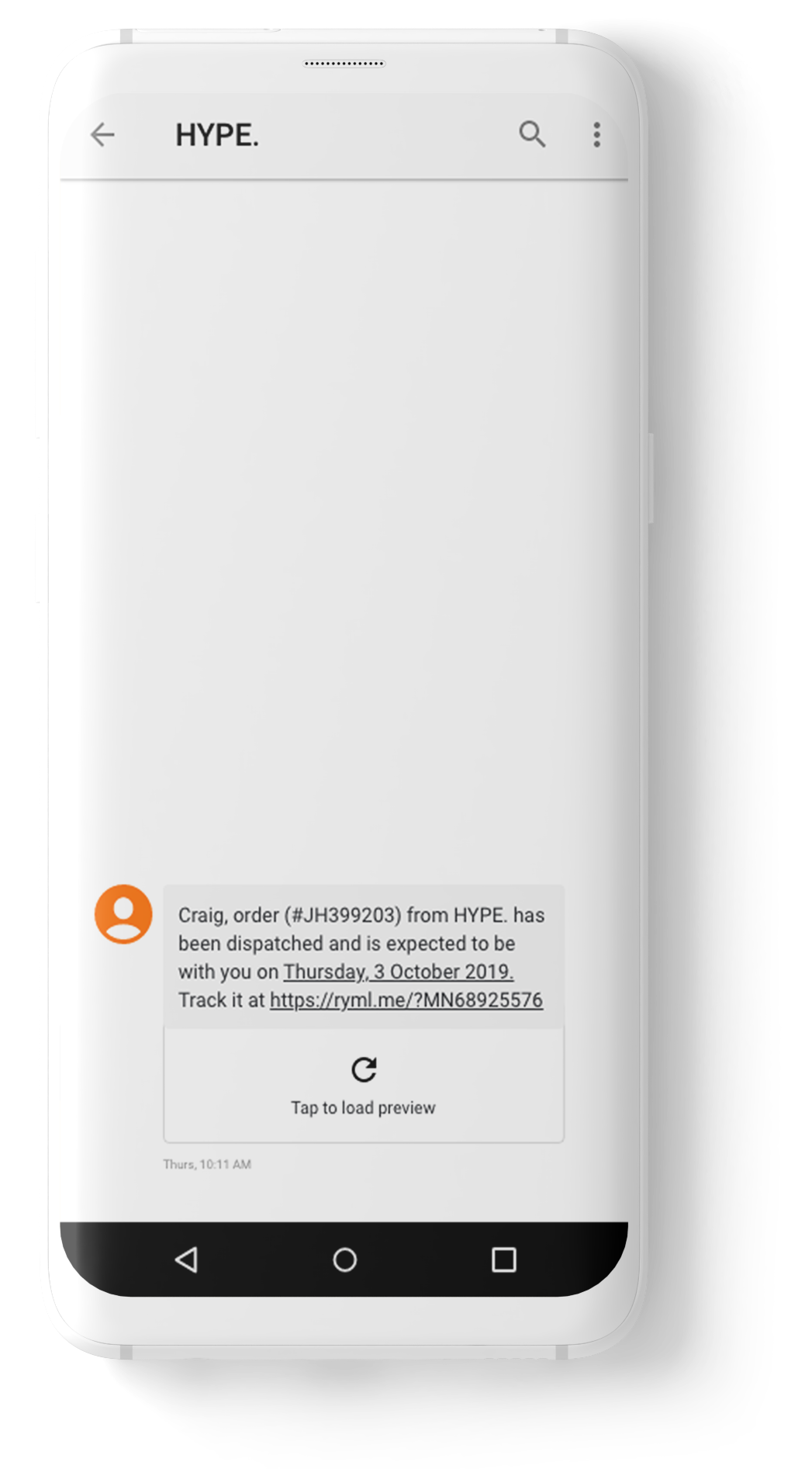
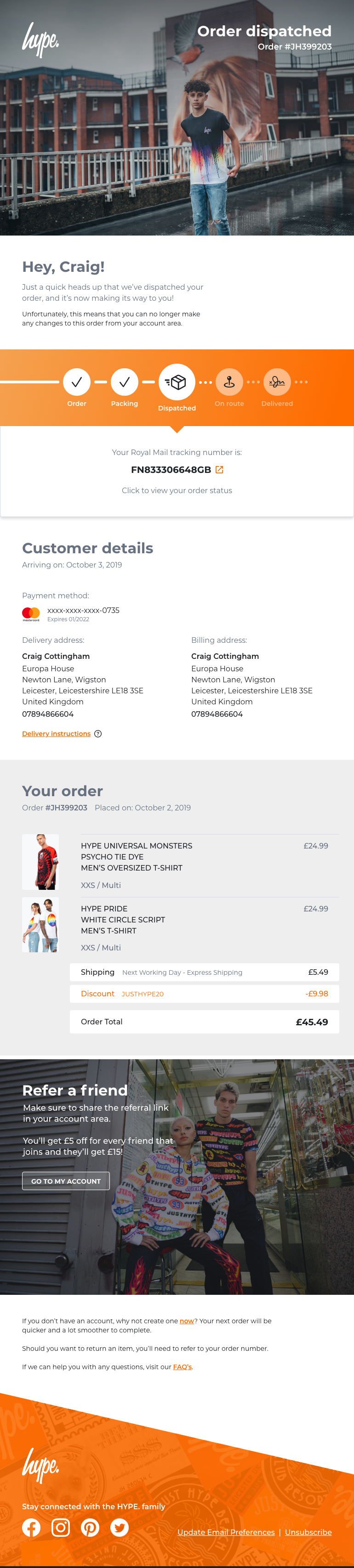
I created a series of email templates covering every stage of the order journey: order confirmation, dispatched, on route, delivered, cancelled, items received for refund and refund processed.
Each email included a visual order tracker showing where the customer was in the journey, what had been completed and what was next.
The tone was warm and friendly rather than generic. The dispatched email included a tracking number linking directly to the courier. The delivered email included a discount code and easy routes to customer support.
Prototype:
Quick add – product card
The card component was rebuilt from scratch with a hover state that hadn’t existed before. On hover, an overlay appeared at the bottom of the image showing available sizes. Unavailable sizes were visually crossed out.
The Quick Add feature delivered four clear benefits: full transparency around stock availability, a future-proof component built to scale, a leaner checkout experience and an end to customers purchasing items that were never available to buy.
Designs:
Quick add – product page
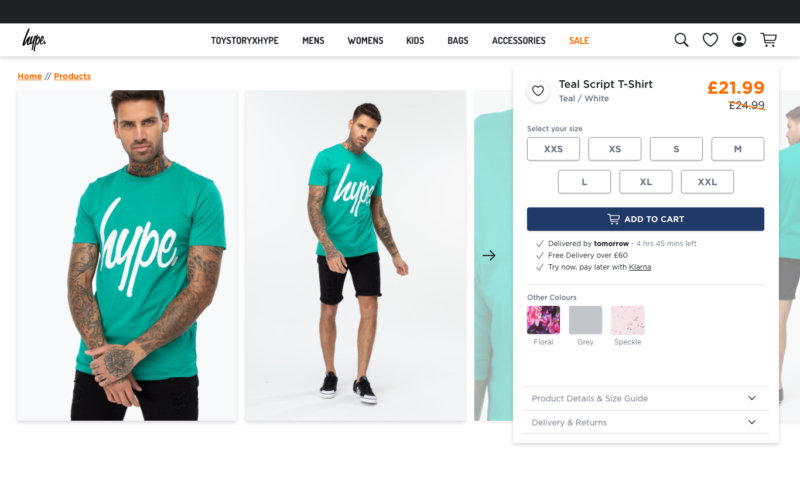
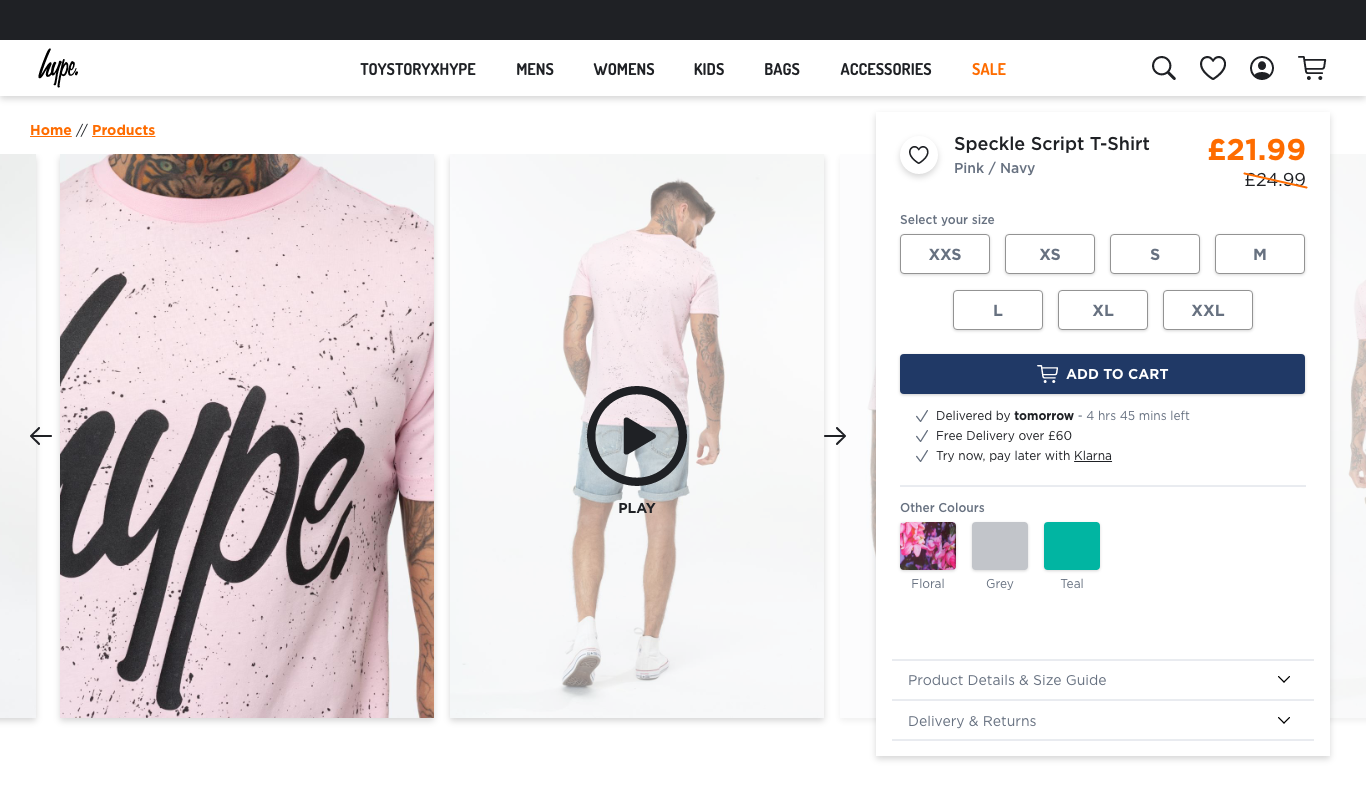
After validating the Quick Add concept on the product card, the same logic was rolled out to the product page. The size selector was updated to show availability clearly, with the out of stock notification flow integrated.
An Add to Cart button remained for customers who wanted to browse first and decide later. Colour variant switching updated the page in real time.
Final designs:
Email communication
Seven email templates designed from scratch with a consistent visual language – order tracker, relevant information surfaced at the right stage of the journey, clear calls to action and a warm tone throughout. The dispatched email linked to courier tracking. The delivered email included a discount code and easy routes to customer support.
Design system:
HYPE DS
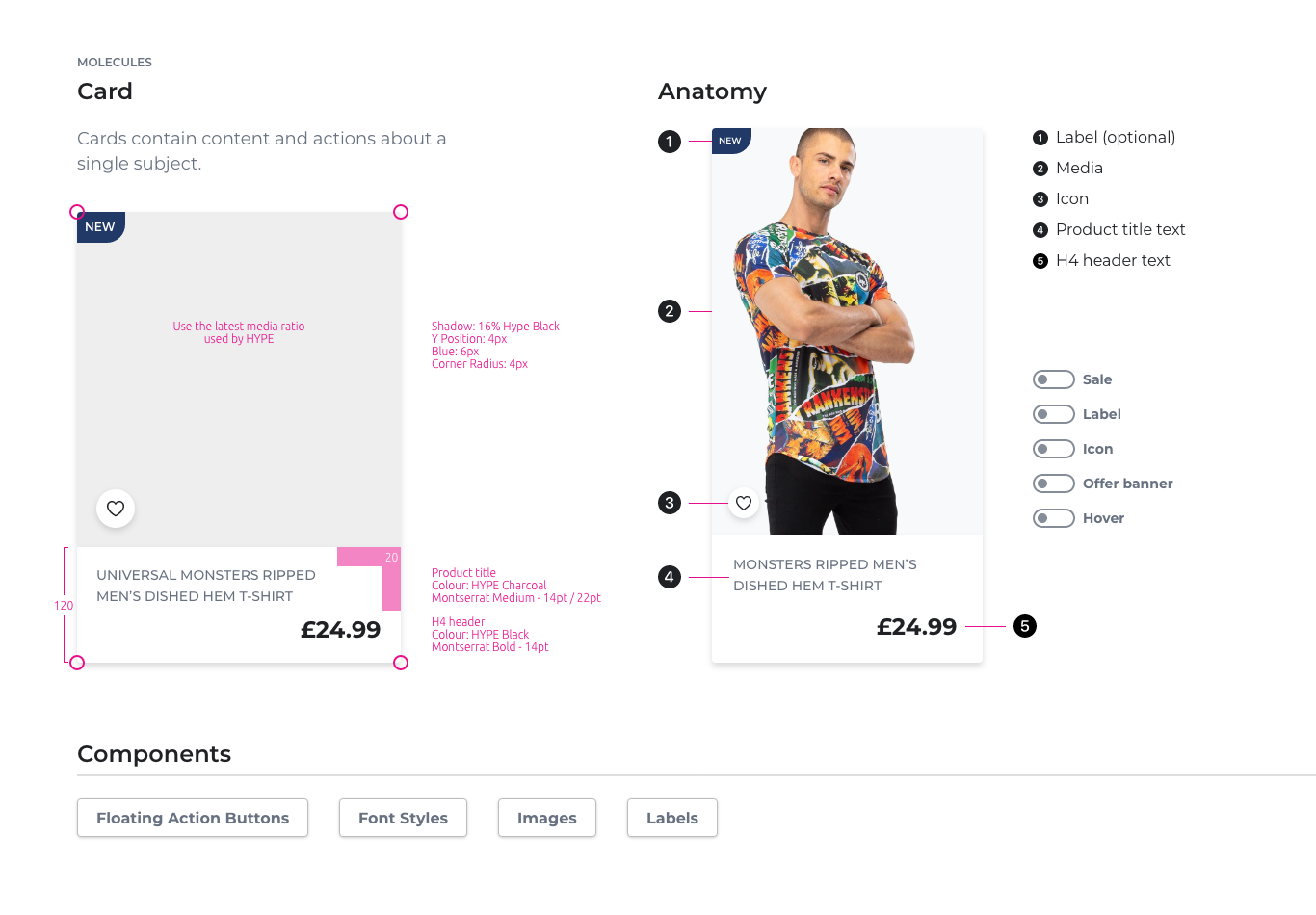
As the project progressed I built out the foundations of a component library in Adobe XD – HYPE DS – using Atomic Design methodology.
Atoms defined the building blocks: buttons, icons, typography, colours, shadows, spacing. These were combined into molecules – the card component being the most developed, with full anatomy documentation, redline specs and toggle states for every variant including Sale, Label, Icon, Offer Banner and Hover.
The goal was to give any designer or developer picking up the work a consistent, documented starting point – rather than recreating components from scratch each time. Designers could toggle specific sections of a component on and off to see exactly how the design would behave in context.
Proposed features:
Wider revamp work
Beyond what shipped, I designed and documented a significant body of work ready for implementation. This included accessibility improvements across the site – auditing fonts and running designs through accessibility scanners to identify and address any serious issues before they reached production.
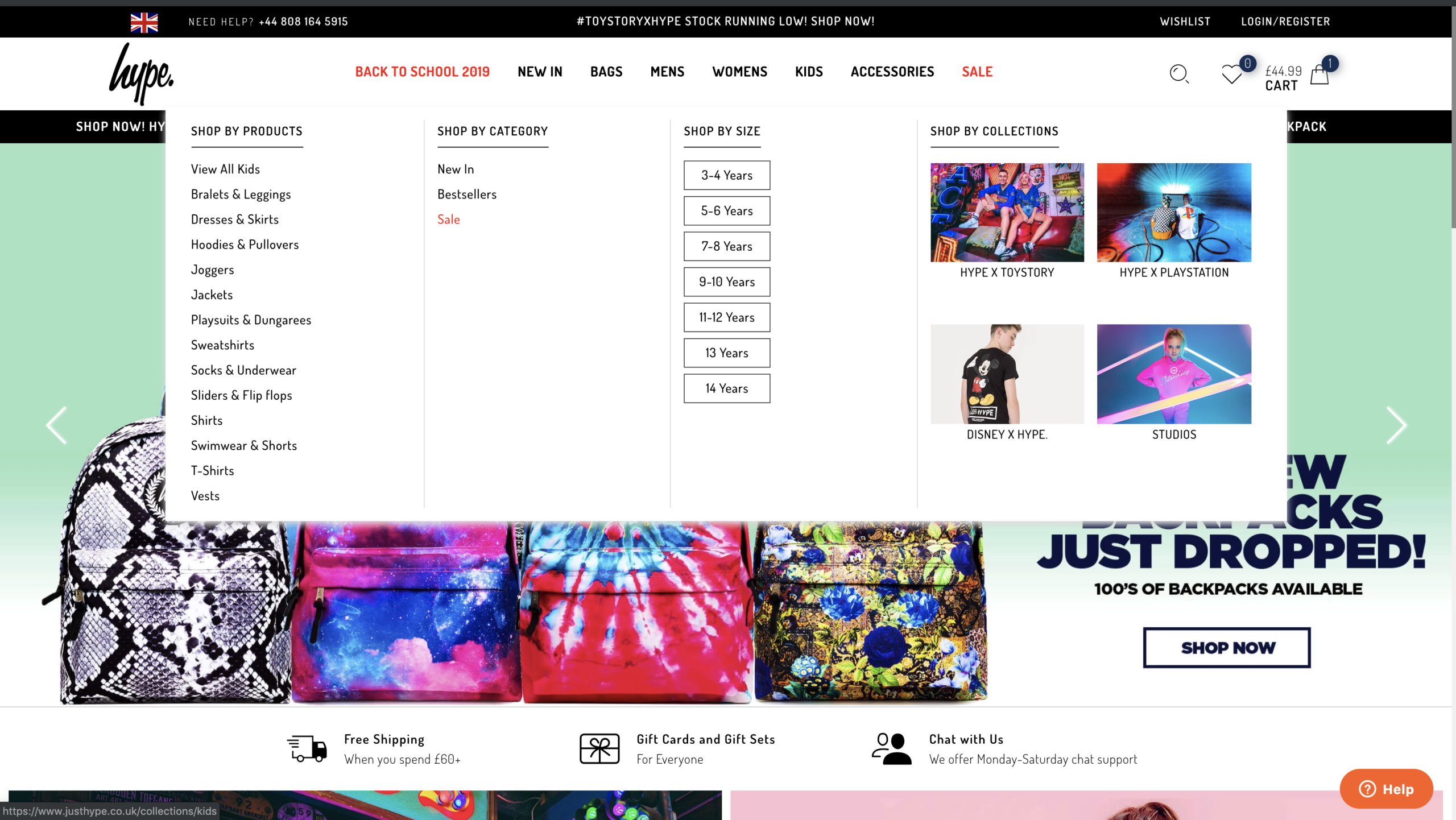
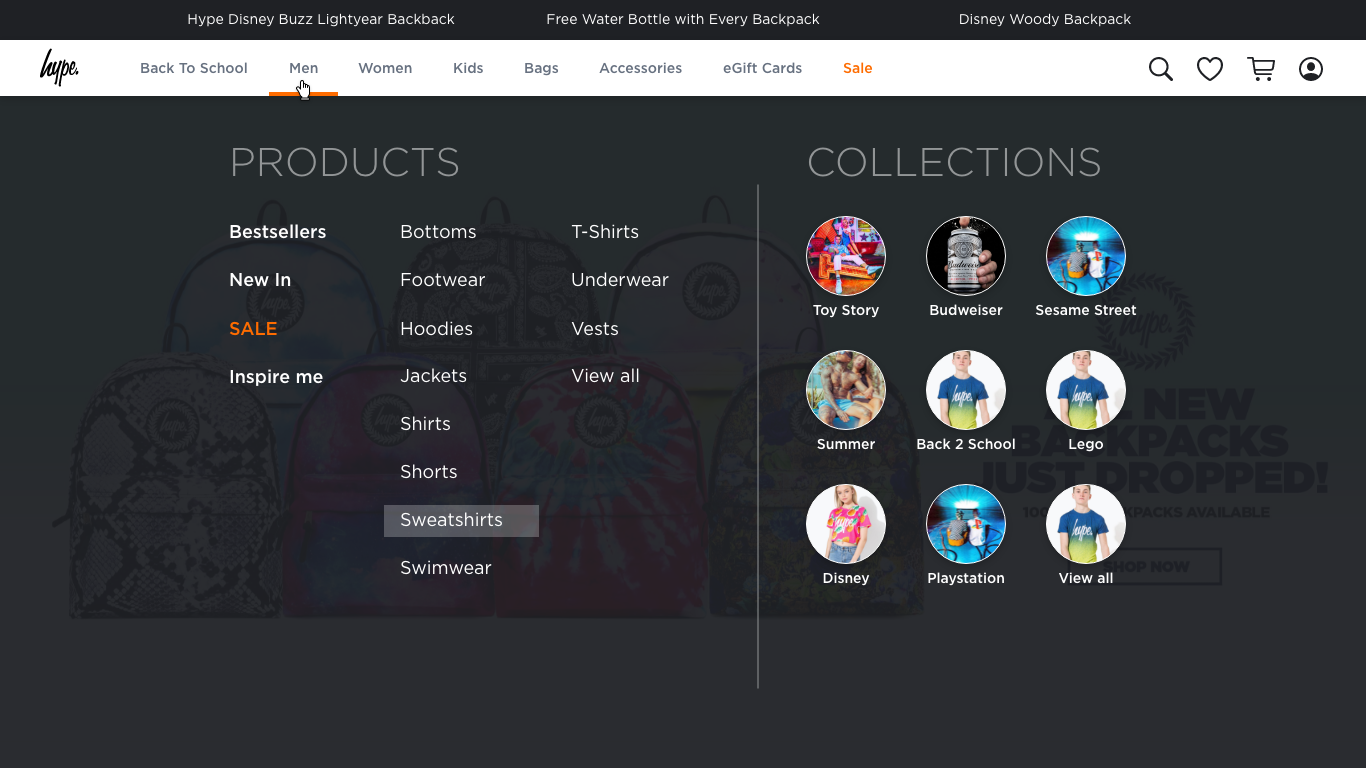
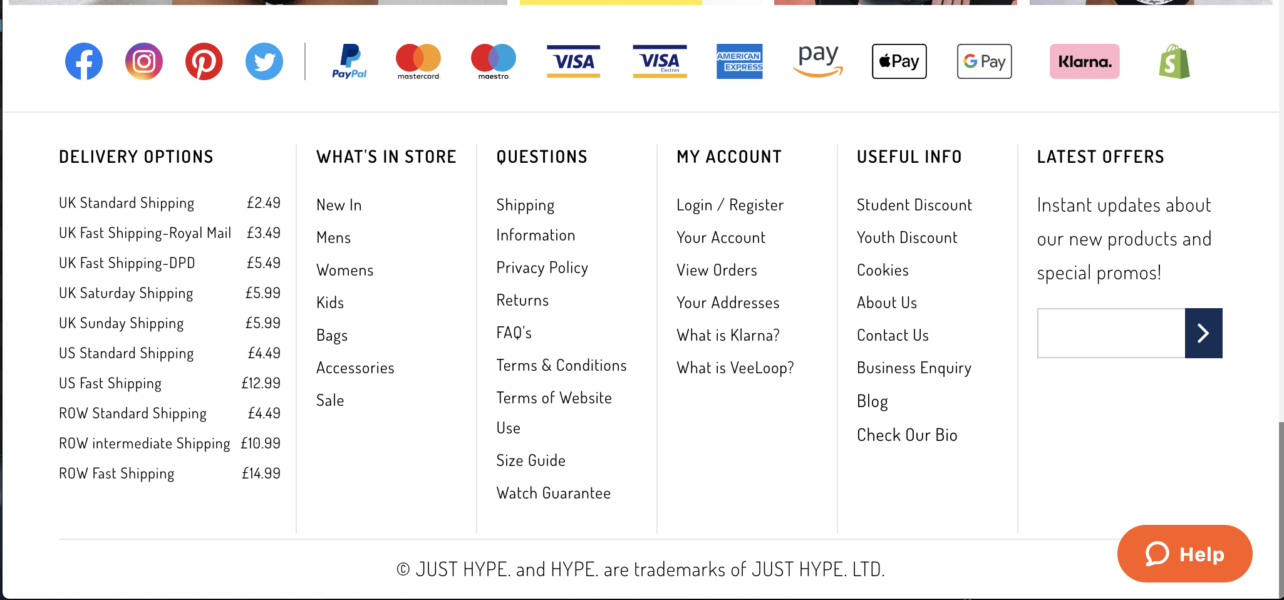
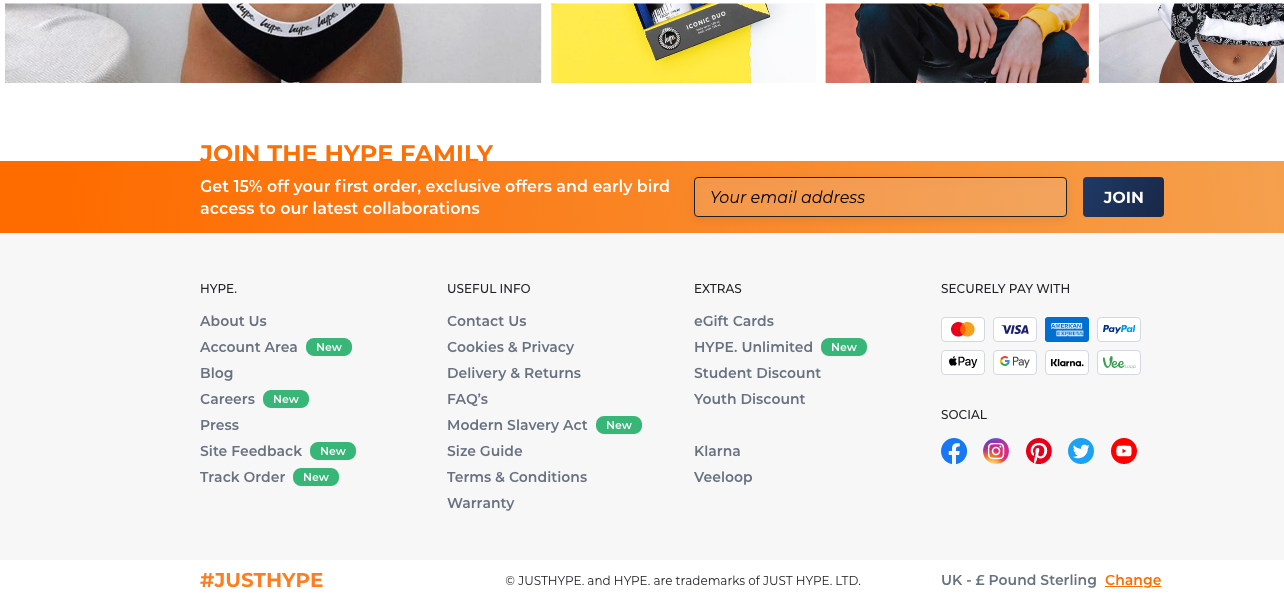
Using the early component foundations from HYPE DS, I started with the elements that touched every single page first – redesigning the global navigation and footer to set a consistent baseline across the site. From there I worked on login and sign up flows, then tackled the wider areas: a full account area, product filtering, homepage revamp, mobile hamburger navigation, loading animation and HYPE Unlimited delivery subscription page.
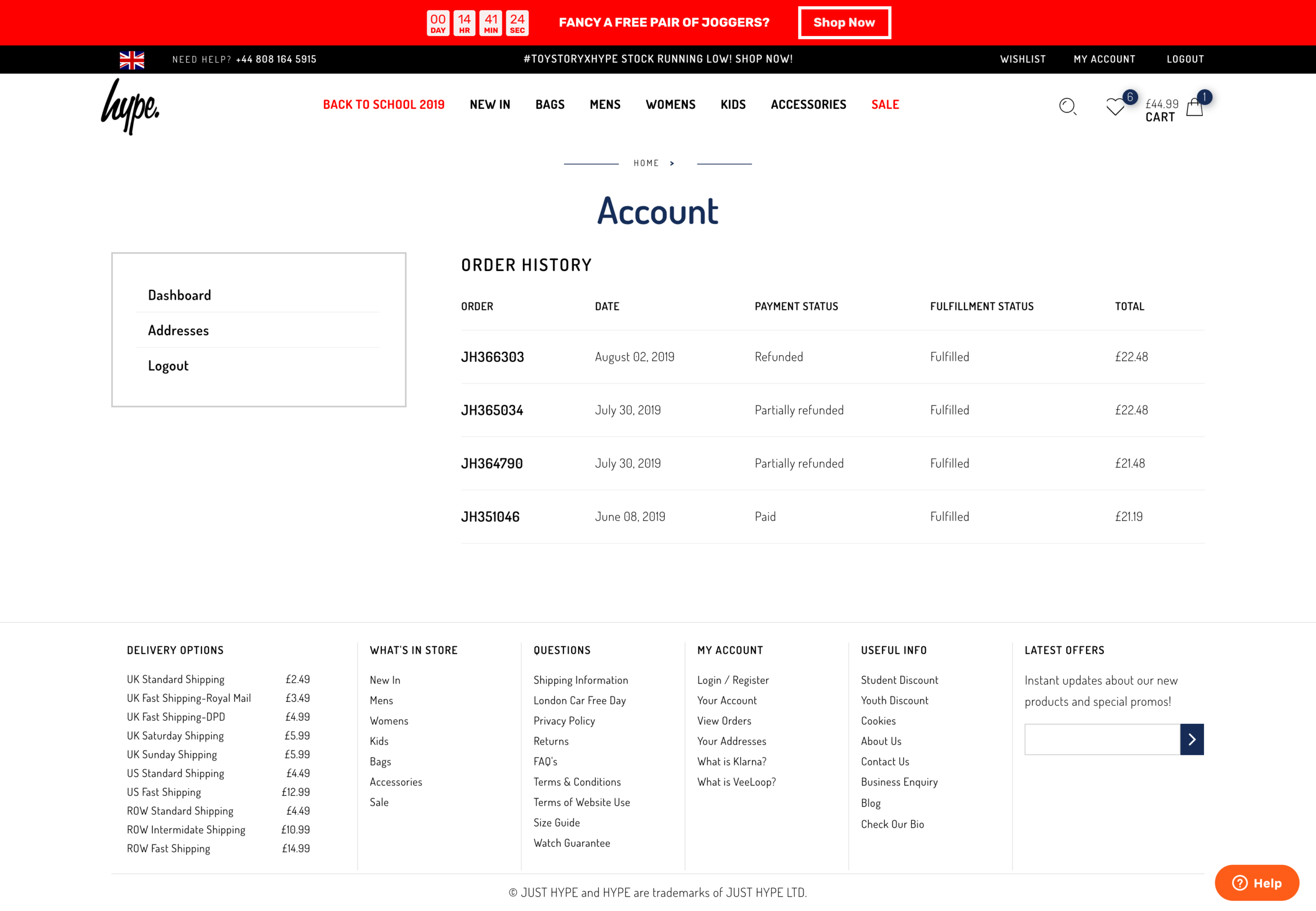
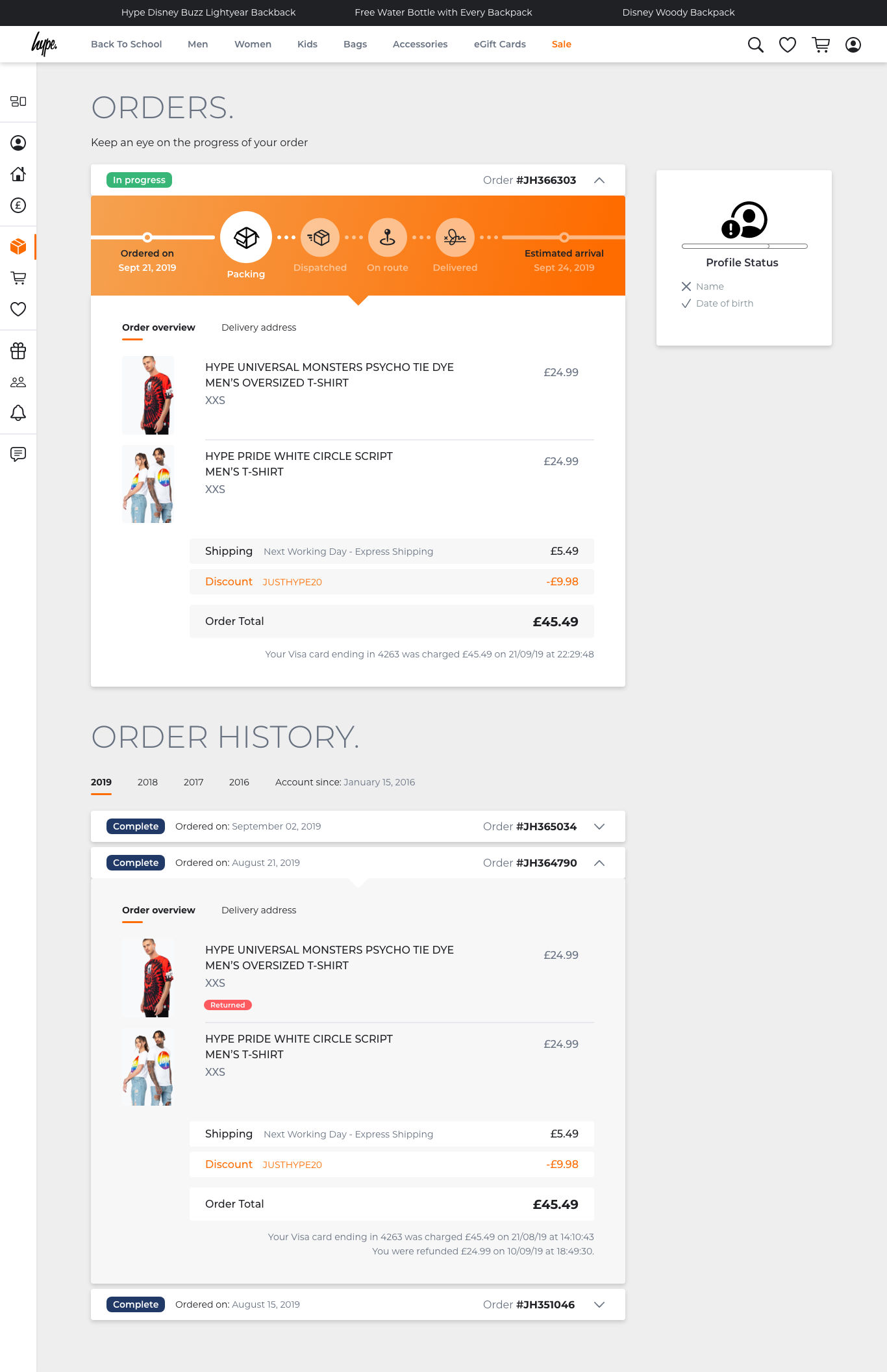
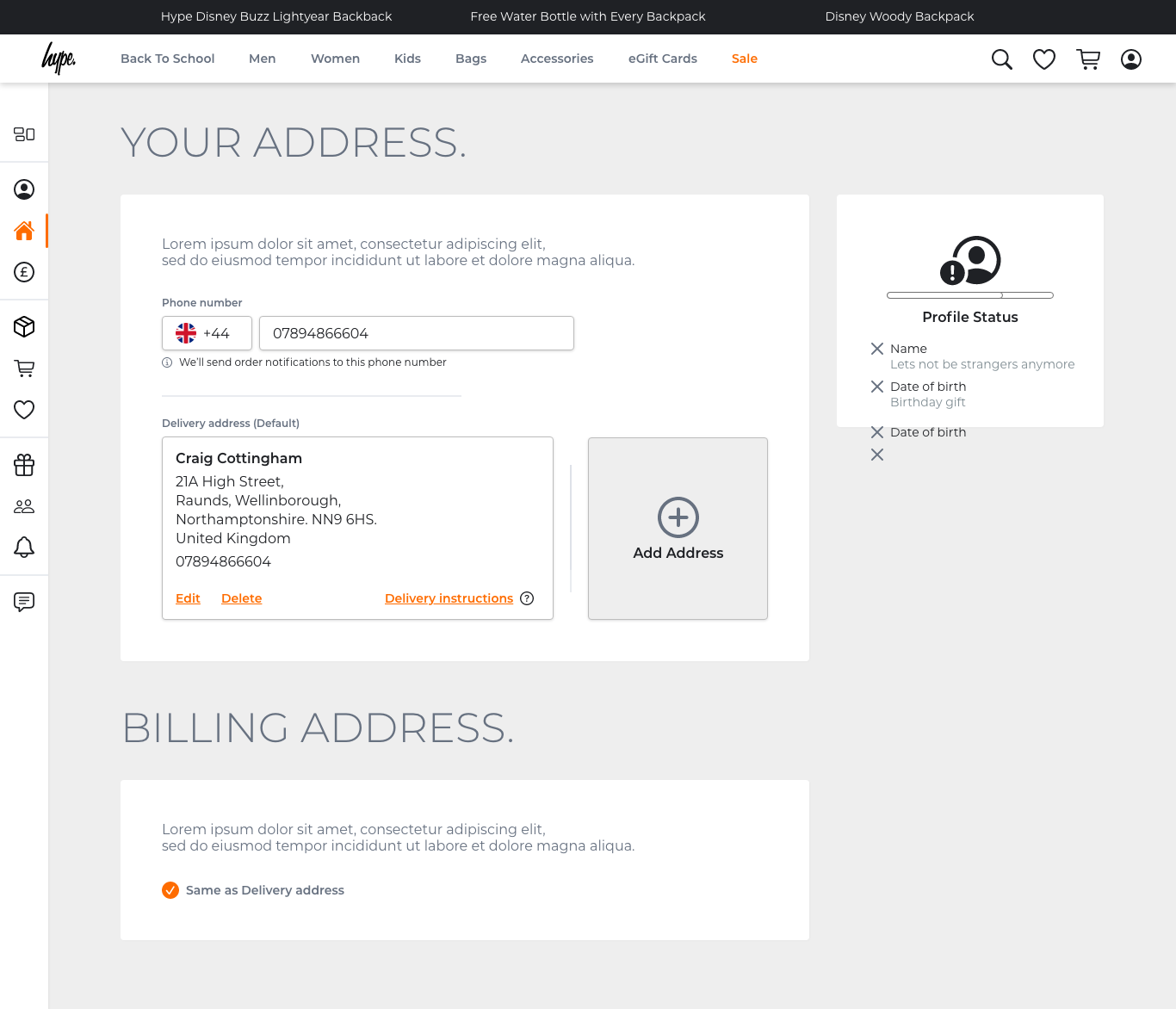
The account area was comprehensive – covering dashboard, personal details, addresses, payment methods with support for Amazon Pay, PayPal, Apple Pay, Google Pay, Klarna and VeeLoop, order history, wishlist, gift cards, referral scheme, notifications and chat support.
Designs:
Global navigation redesign
Before and after
Designs:
Footer redesign
Before and after
Designs:
Account area
Order history
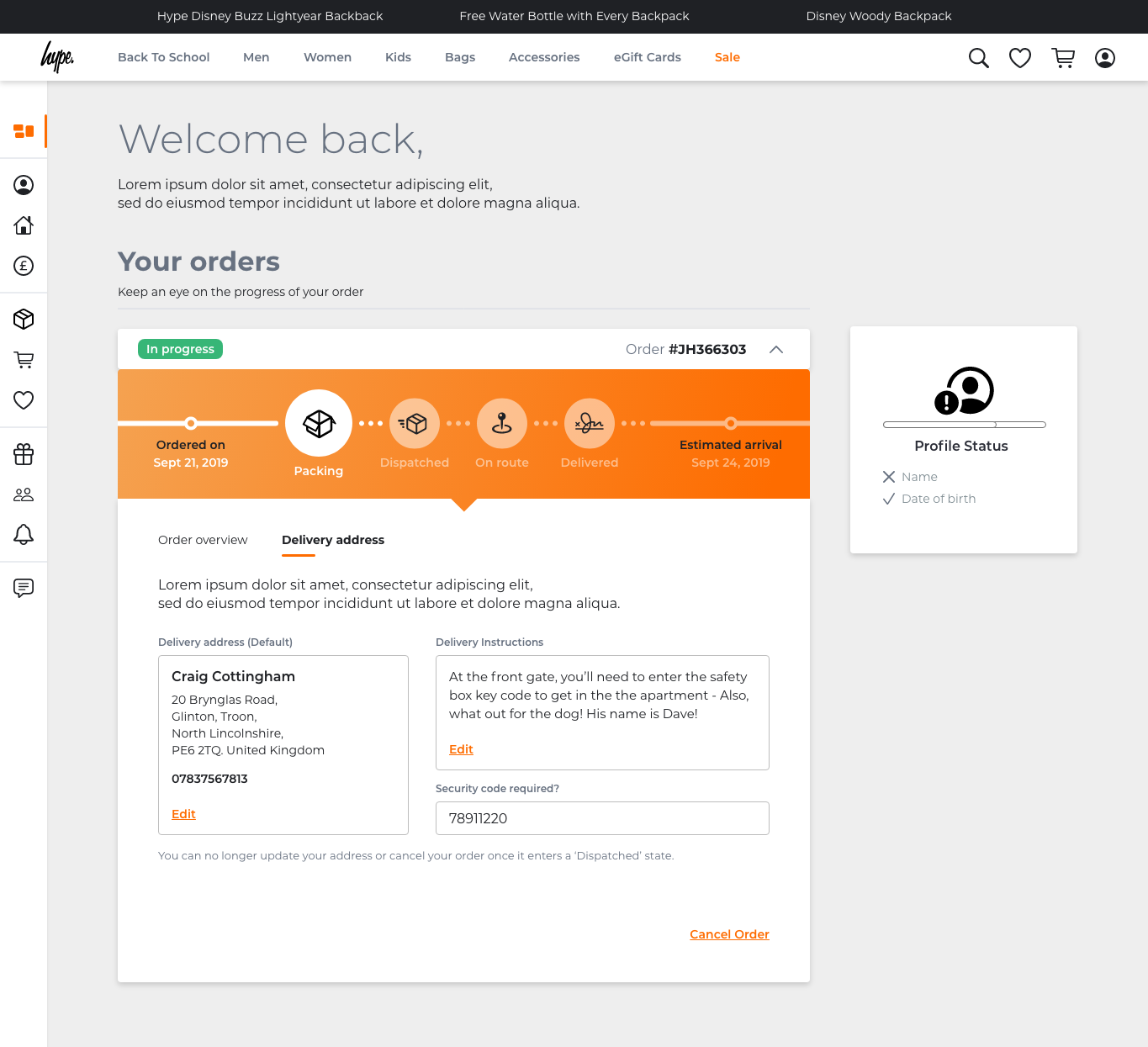
Order detail
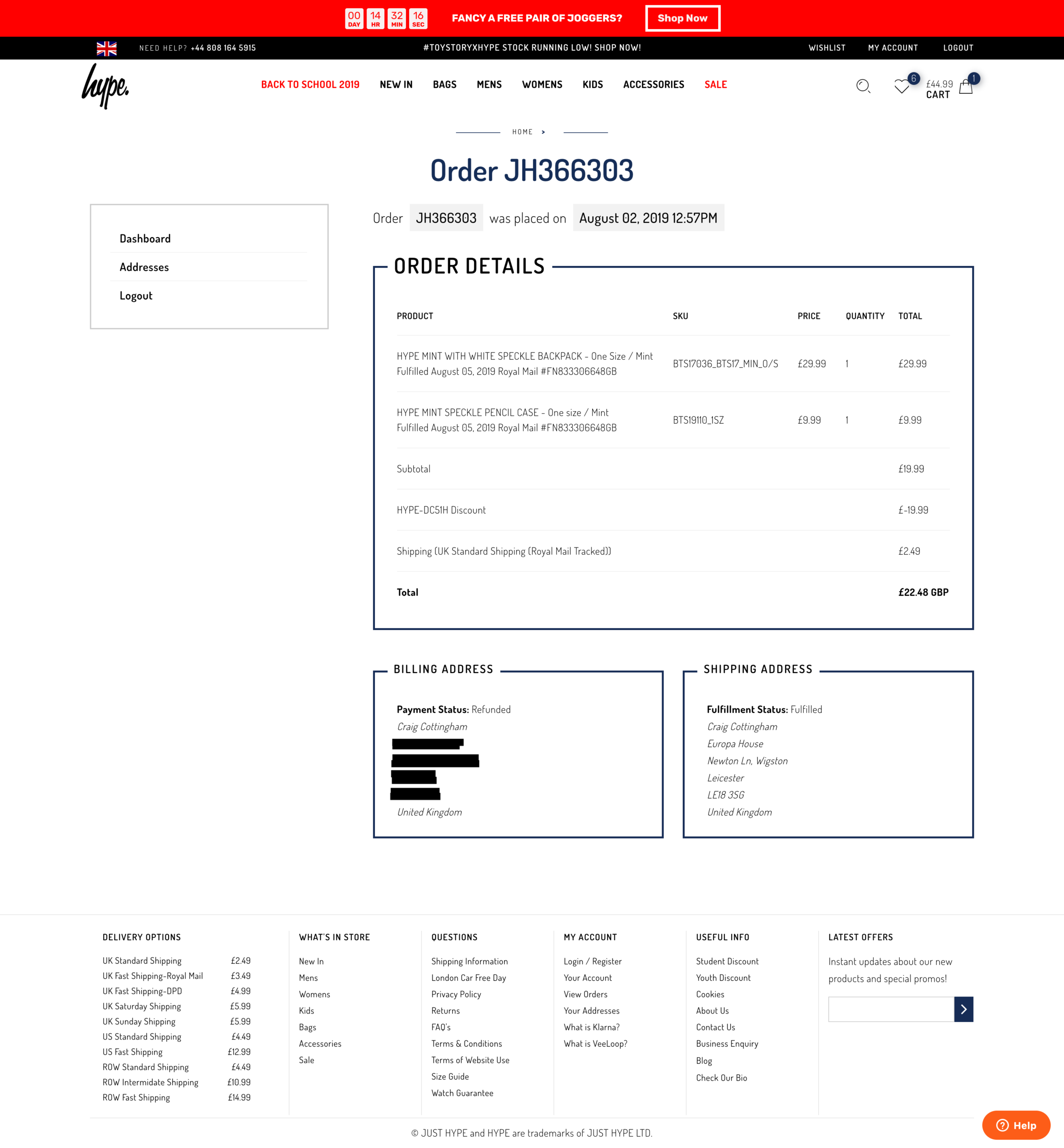
Addresses
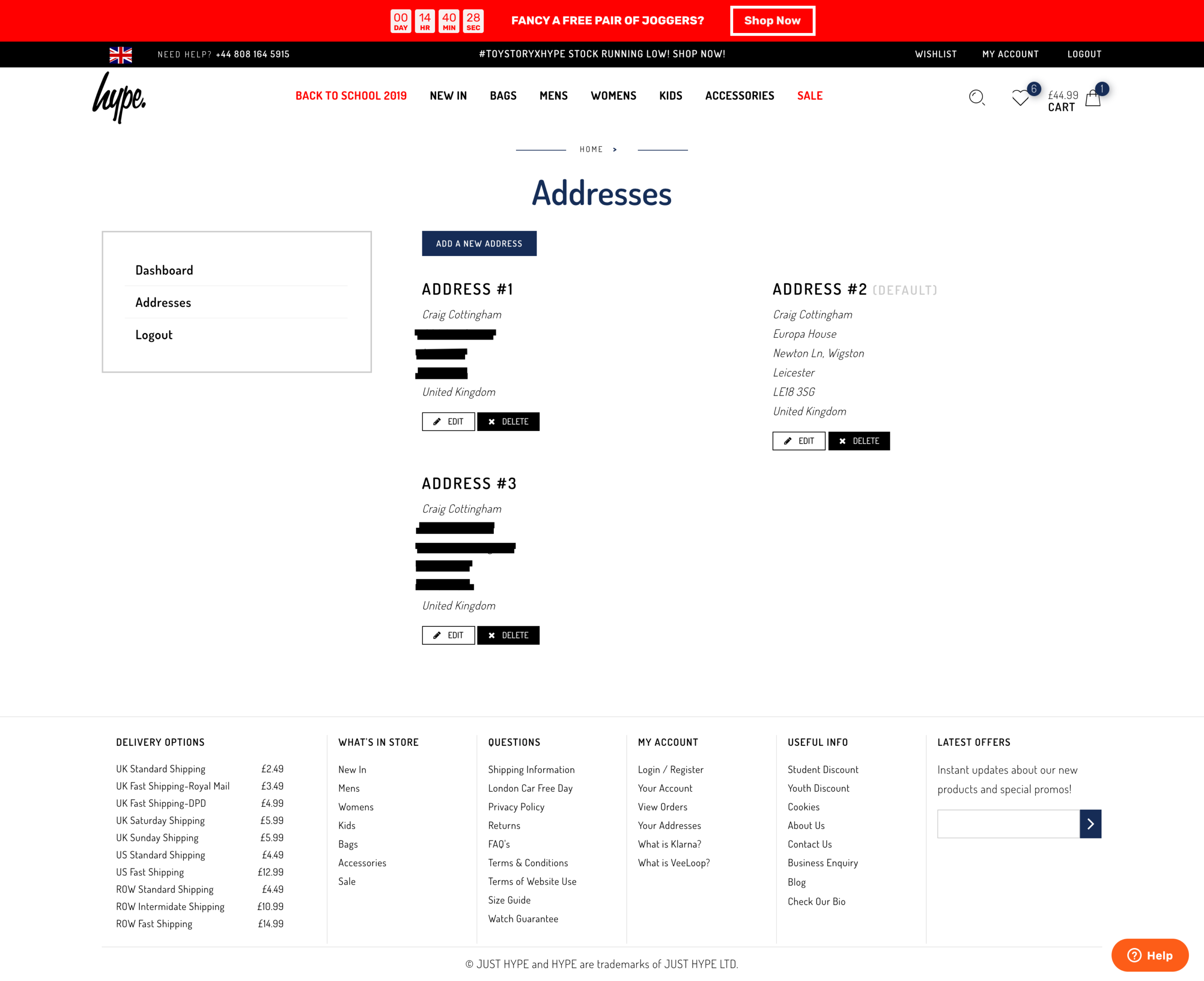
Designs:
Product page
Before designing the new product page, I analysed the existing design and documented the specific issues contributing to poor user experience and lost sales.
The pain points:
Stock availability shown too late
Selecting a size from the dropdown only told you it was unavailable after you'd selected it.
Multiple unnecessary clicks to discover something that should have been visible from the start.
Repeated content
The item name and description appeared three times on the same page. On mobile, all three were visible simultaneously on screen.
Pointless repetition that added noise without adding value.
Broken image thumbnails
To view the next product image, users had to scroll down to click a thumbnail, then scroll back up to see it. A left/right arrow would have solved this entirely.
Size Guide button out of place
Visually prominent but contextually odd, sitting awkwardly without any clear relationship to the surrounding elements.
Clutter and distraction
At the point a user had already chosen an item and navigated to its page, the design felt like it was actively trying to pull them away from buying it.
The Our Offer panel was the most obvious offender - irrelevant offers that didn't adapt based on who was viewing them, shown to everyone regardless of gender or age.
Wishlist buried at the bottom
A feature users actually wanted was hidden at the bottom of the page, out of the natural purchase flow.
Our Offer panel broken on scroll
When scrolling down the page the panel title clipped and cut off, breaking the layout. A visible bug that had gone unaddressed.
Quantity selector blending in
Hotjar recordings showed users regularly missing the quantity input because it visually blended into the surrounding buttons. People were buying single items when they wanted multiples.
Before and after
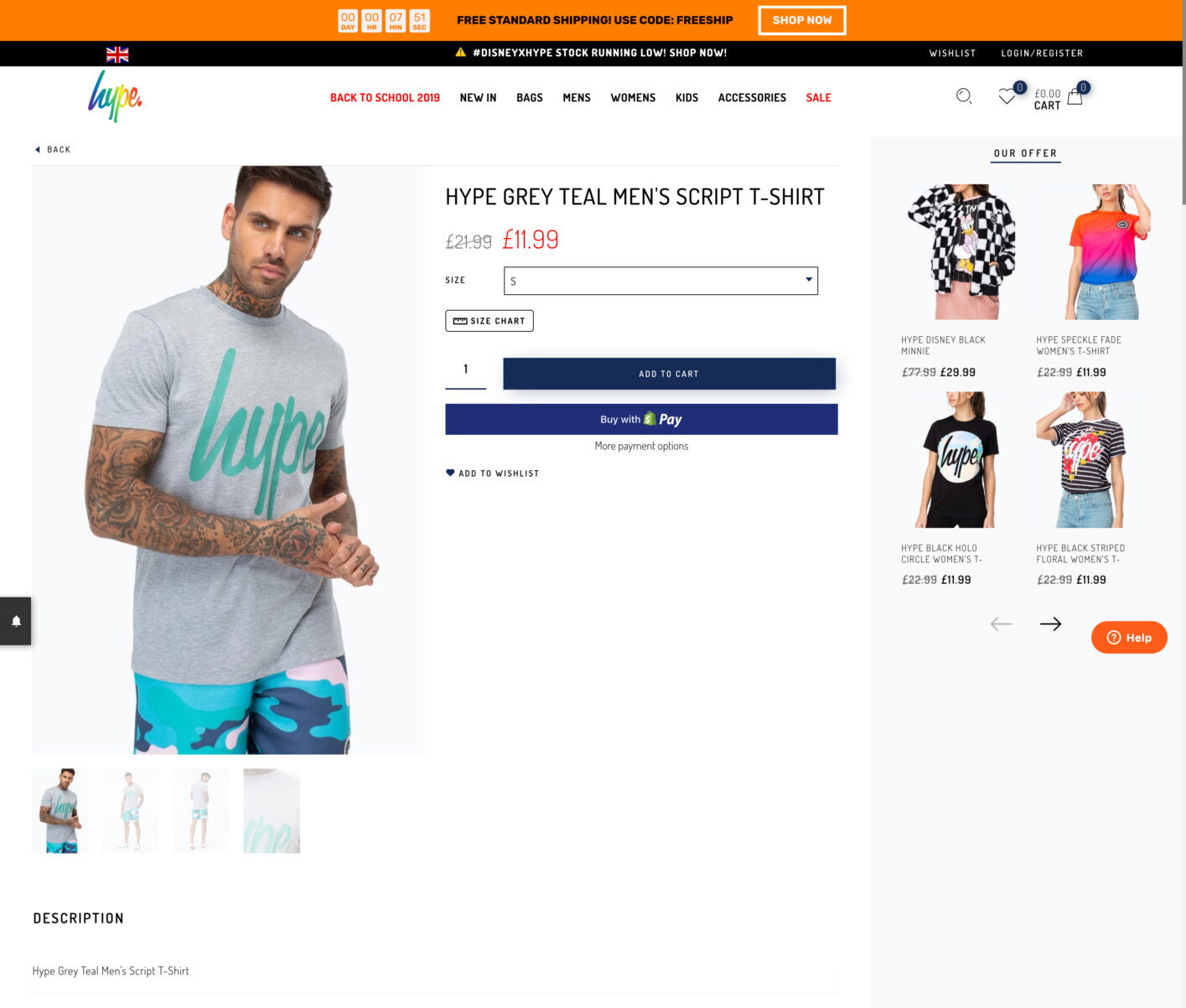
The redesign addressed each of these directly
Stock availability surfaced upfront via the Quick Add feature, layout decluttered, repeated content removed, wishlist repositioned, and the image navigation.

Outcomes:
The results
The two pieces that shipped – stock availability and order communications – addressed the two biggest sources of negative feedback directly. The impact was measurable.
Stock availability and Website revamp
HYPE is a British streetwear brand known for bold prints and casual apparel with a serious following. When I joined, the e-commerce website was generating a significant volume of negative feedback – customers paying for items only to be told they were out of stock, and then hearing nothing about it afterwards. The Trustpilot rating sat at 3.7.
I was brought in to lead a full UX overhaul, and while not everything made it to launch during my time there, the two most impactful pieces did – and the Trustpilot rating climbed to 4.3.
My role
I was the sole designer on the project, responsible for the full process end to end – research, data analysis, affinity mapping, user flows, wireframes, UI design, prototyping and design system foundations. Everything was built in Adobe XD.
The scope covered stock availability, order communications, account area, navigation, product pages, login flows, a component library and the beginnings of a full design system.
Research:
Data gathering
Before touching a wireframe I went straight to the data. HYPE had Trustpilot, Zendesk and Google Analytics – though Analytics wasn’t properly embedded and the data was unreliable, so Trustpilot and Zendesk did the heavy lifting.
I reviewed three months of feedback, focusing on 1 and 2 star reviews, and started grouping complaints into themes.
The volume was striking. Two issues dominated everything else:
Beyond those two, there were 13 complaints about product quality or incorrect sizing, and 6 about poor customer service.
The Trustpilot reviews told the story clearly:
Received an email the following day saying my order had been cancelled and I had been refunded due to no stock availability
Research:
Affinity mapping
I mapped the complaints into categories to find the patterns – grouping feedback from the three month window under common themes.
Two areas jumped out immediately as the priority: stock transparency and order communication. Everything else was secondary.
Ideation:
Journey flows
To understand the scale of the problem I mapped out the current checkout journey against a proposed new one – comparing them side by side to highlight where friction could be removed.
Current flow – Click count: 18+
A user selects an item, chooses a size from a dropdown that gives no indication of stock availability, adds to cart, proceeds through multiple checkout screens and enters their full details from scratch every single time – name, email, shipping address, billing address, card number, card name, expiry date, security code and mobile number.
After all of that, they find out the item is out of stock. They’ve already been charged.
Proposed flow – Click count: 4
Hover over an item to see available sizes. Select a size. Choose a saved payment method. Confirm order. Done.
For returning customers with saved details, that’s the entire journey.
Key challenges:
Customers buying items that were out of stock
Challenge
The existing size selector on the product page showed all sizes but gave no indication of availability.
Customers selected a size, added to cart, completed the entire checkout and only after hitting Complete Order were they told the item wasn’t available. They’d been charged.
The refund took 3–5 working days. It’s not hard to see why people were furious.
Solution
I designed a Quick Add feature for the product card. On hover, an overlay appeared showing which sizes were available for that item, with unavailable sizes shown with a strikethrough.
Customers could see stock status before clicking through to anything. If their size was out of stock, they could tap it to enter their email and be notified when it came back in.
Selecting an available size added it directly to the basket. For logged-in users with saved payment details, the checkout came down to 4 clicks.
Key challenges:
No communication after purchase
Challenge
Once an order was placed, customers heard nothing. No confirmation, no dispatch notification, no tracking. Some customers only received an email asking them to review a product that hadn’t even arrived yet – which understandably made people wonder if it was a scam.
When I dug into the email settings, I found there wasn’t any logic in place driving the communications at all. I also discovered that customers with personalised email addresses outside of Gmail, Outlook or Yahoo were getting bounced entirely – their emails were never sending.
I fixed the settings first, which was an immediate win, then designed a full communication system around it.
Solution
I created a series of email templates covering every stage of the order journey: order confirmation, dispatched, on route, delivered, cancelled, items received for refund and refund processed.
Each email included a visual order tracker showing where the customer was in the journey, what had been completed and what was next.
The tone was warm and friendly rather than generic. The dispatched email included a tracking number linking directly to the courier. The delivered email included a discount code and easy routes to customer support.
Key challenges:
Quick add – product card
The card component was rebuilt from scratch with a hover state that hadn’t existed before. On hover, an overlay appeared at the bottom of the image showing available sizes. Unavailable sizes were visually crossed out.
The Quick Add feature delivered four clear benefits: full transparency around stock availability, a future-proof component built to scale, a leaner checkout experience and an end to customers purchasing items that were never available to buy.
Designs:
Quick add – product page
After validating the Quick Add concept on the product card, the same logic was rolled out to the product page. The size selector was updated to show availability clearly, with the out of stock notification flow integrated.
An Add to Cart button remained for customers who wanted to browse first and decide later. Colour variant switching updated the page in real time.
Final designs:
Email communication
Seven email templates designed from scratch with a consistent visual language – order tracker, relevant information surfaced at the right stage of the journey, clear calls to action and a warm tone throughout. The dispatched email linked to courier tracking. The delivered email included a discount code and easy routes to customer support.
Design system:
HYPE DS
As the project progressed I built out the foundations of a component library in Adobe XD – HYPE DS – using Atomic Design methodology.
Atoms defined the building blocks: buttons, icons, typography, colours, shadows, spacing. These were combined into molecules – the card component being the most developed, with full anatomy documentation, redline specs and toggle states for every variant including Sale, Label, Icon, Offer Banner and Hover.
The goal was to give any designer or developer picking up the work a consistent, documented starting point – rather than recreating components from scratch each time. Designers could toggle specific sections of a component on and off to see exactly how the design would behave in context.
Proposed features:
Wider revamp work
Beyond what shipped, I designed and documented a significant body of work ready for implementation. This included accessibility improvements across the site – auditing fonts and running designs through accessibility scanners to identify and address any serious issues before they reached production.
Using the early component foundations from HYPE DS, I started with the elements that touched every single page first – redesigning the global navigation and footer to set a consistent baseline across the site. From there I worked on login and sign up flows, then tackled the wider areas: a full account area, product filtering, homepage revamp, mobile hamburger navigation, loading animation and HYPE Unlimited delivery subscription page.
The account area was comprehensive – covering dashboard, personal details, addresses, payment methods with support for Amazon Pay, PayPal, Apple Pay, Google Pay, Klarna and VeeLoop, order history, wishlist, gift cards, referral scheme, notifications and chat support.
Designs:
Global navigation redesign
Before and after
Designs:
Footer redesign
Before and after
Designs:
Account area
Order history
Order detail
Addresses
Designs:
Product page
Before designing the new product page, I analysed the existing design and documented the specific issues contributing to poor user experience and lost sales.
The pain points:
Stock availability shown too late
Selecting a size from the dropdown only told you it was unavailable after you'd selected it.
Multiple unnecessary clicks to discover something that should have been visible from the start.
Clutter and distraction
At the point a user had already chosen an item and navigated to its page, the design felt like it was actively trying to pull them away from buying it.
The Our Offer panel was the most obvious offender - irrelevant offers that didn't adapt based on who was viewing them, shown to everyone regardless of gender or age.
Repeated content
The item name and description appeared three times on the same page. On mobile, all three were visible simultaneously on screen.
Pointless repetition that added noise without adding value.
Wishlist buried at the bottom
A feature users actually wanted was hidden at the bottom of the page, out of the natural purchase flow.
Broken image thumbnails
To view the next product image, users had to scroll down to click a thumbnail, then scroll back up to see it. A left/right arrow would have solved this entirely.
Our Offer panel broken on scroll
When scrolling down the page the panel title clipped and cut off, breaking the layout. A visible bug that had gone unaddressed.
Size Guide button out of place
Visually prominent but contextually odd, sitting awkwardly without any clear relationship to the surrounding elements.
Quantity selector blending in
Hotjar recordings showed users regularly missing the quantity input because it visually blended into the surrounding buttons. People were buying single items when they wanted multiples.
Before and after
The redesign addressed each of these directly
Stock availability surfaced upfront via the Quick Add feature, layout decluttered, repeated content removed, wishlist repositioned, and the image navigation.
Outcomes:
The results
The two pieces that shipped – stock availability and order communications – addressed the two biggest sources of negative feedback directly. The impact was measurable.